







The complete budgeting app that shows your balance for every day ahead

Choose from four budgeting methods and periods that follow your paychecks, and see which day before payday your balance runs lowest.

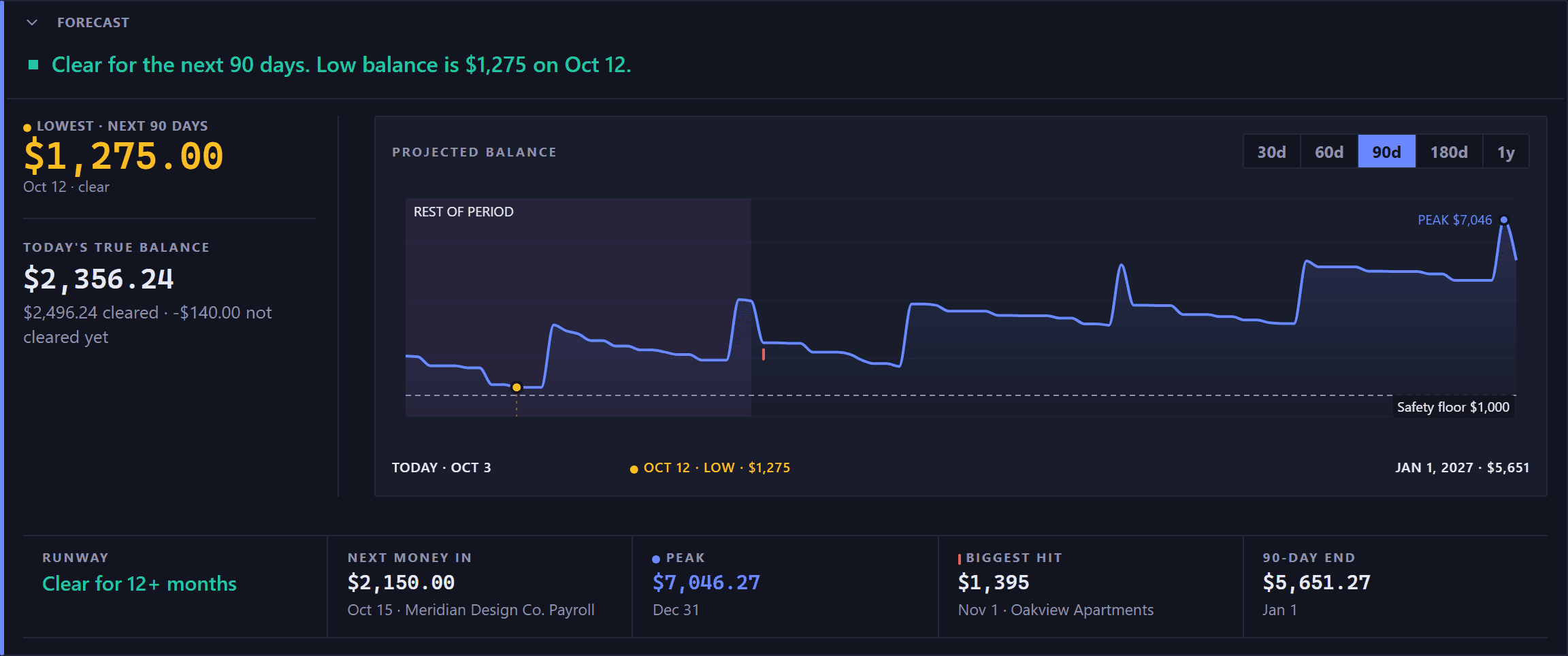
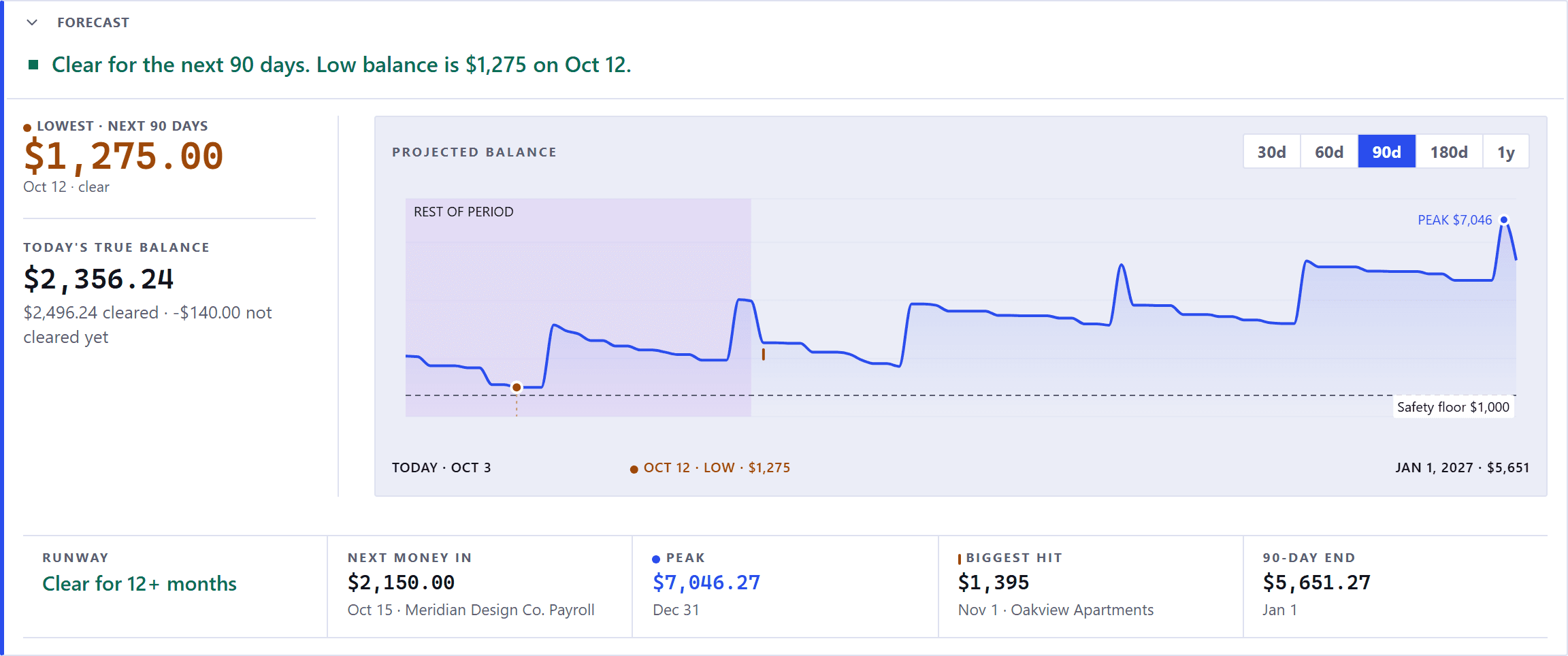
The Command Center forecast panel. A green square and a green line across the top read: clear for the next 90 days, then the low balance with its amount and its date. A narrow column on the left carries the lowest point over the next 90 days, large and in the warning amber with an amber dot beside its label because the low is the thing to watch, with its date and the word clear, and beneath a rule, in smaller type, today's true balance with a quieter line splitting it into what has cleared and what has not cleared yet. The chart fills the rest, labeled projected balance, with span buttons from 30d to 1y and 90d selected; it runs from today, dips to the low early in the range and marks it with an amber dot, rises in steps on each payday, stays above a dashed safety floor line, and climbs to a peak labeled in blue just before the end of the range, with a row beneath it naming today, the low with its amount, and the end of the range with its figure. Across the bottom sits a rail of five cells divided by hairlines, each a small label over a figure, and every cell but runway with a quieter line of context beneath it: runway, clear for 12 plus months, in green; next money in with its date and payer; the peak in blue with a blue dot and its date; the biggest hit with its date and payee; and the 90 day end with its date.The Command Center forecast panel. A green square and a green line across the top read: clear for the next 90 days, then the low balance with its amount and its date. A narrow column on the left carries the lowest point over the next 90 days, large and in the warning amber with an amber dot beside its label because the low is the thing to watch, with its date and the word clear, and beneath a rule, in smaller type, today's true balance with a quieter line splitting it into what has cleared and what has not cleared yet. The chart fills the rest, labeled projected balance, with span buttons from 30d to 1y and 90d selected; it runs from today, dips to the low early in the range and marks it with an amber dot, rises in steps on each payday, stays above a dashed safety floor line, and climbs to a peak labeled in blue just before the end of the range, with a row beneath it naming today, the low with its amount, and the end of the range with its figure. Across the bottom sits a rail of five cells divided by hairlines, each a small label over a figure, and every cell but runway with a quieter line of context beneath it: runway, clear for 12 plus months, in green; next money in with its date and payer; the peak in blue with a blue dot and its date; the biggest hit with its date and payee; and the 90 day end with its date.
The Command Center. Every screenshot on this page is the live app, using demo data.

Every account has a calendar and every day has a balance

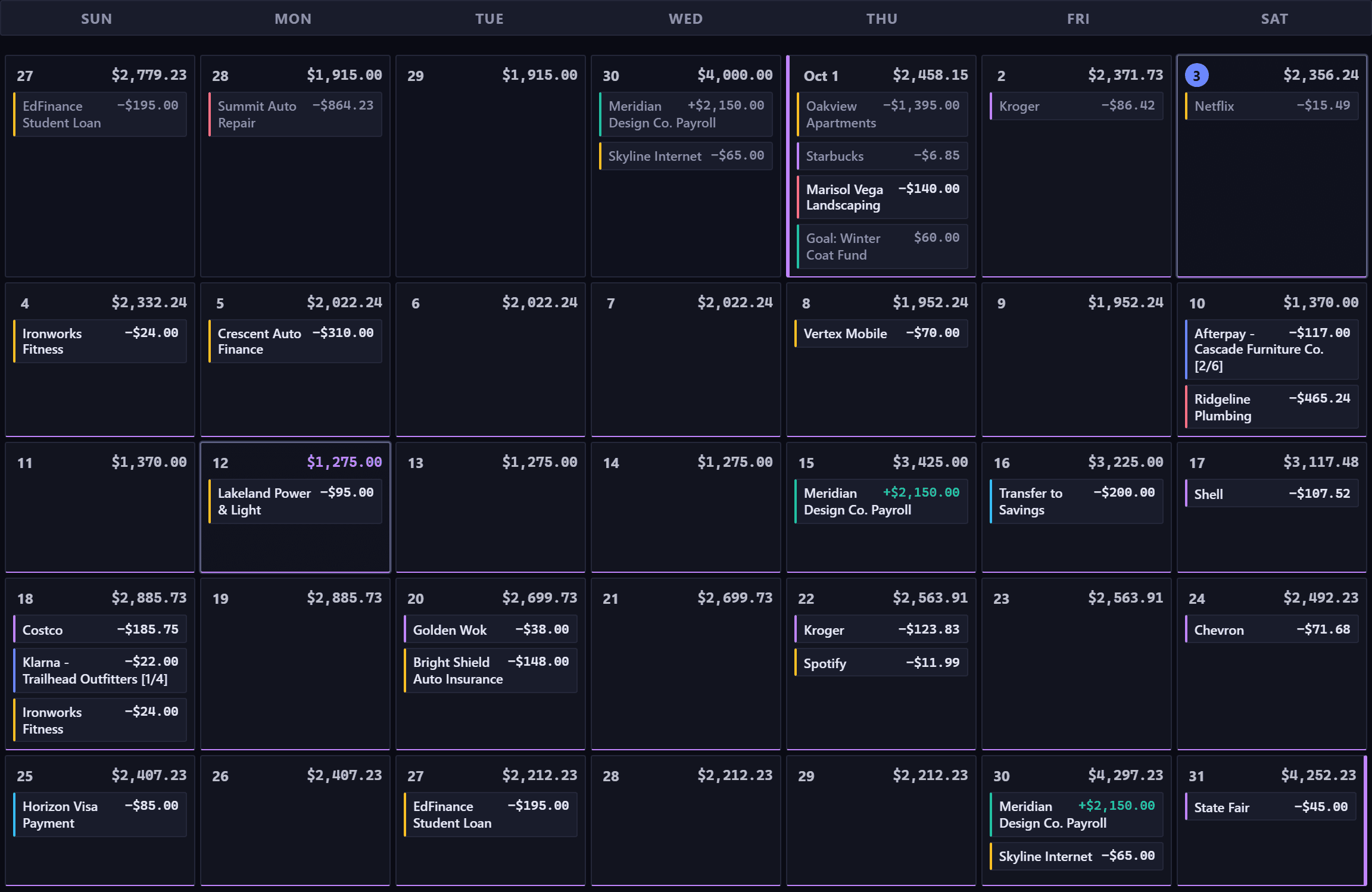
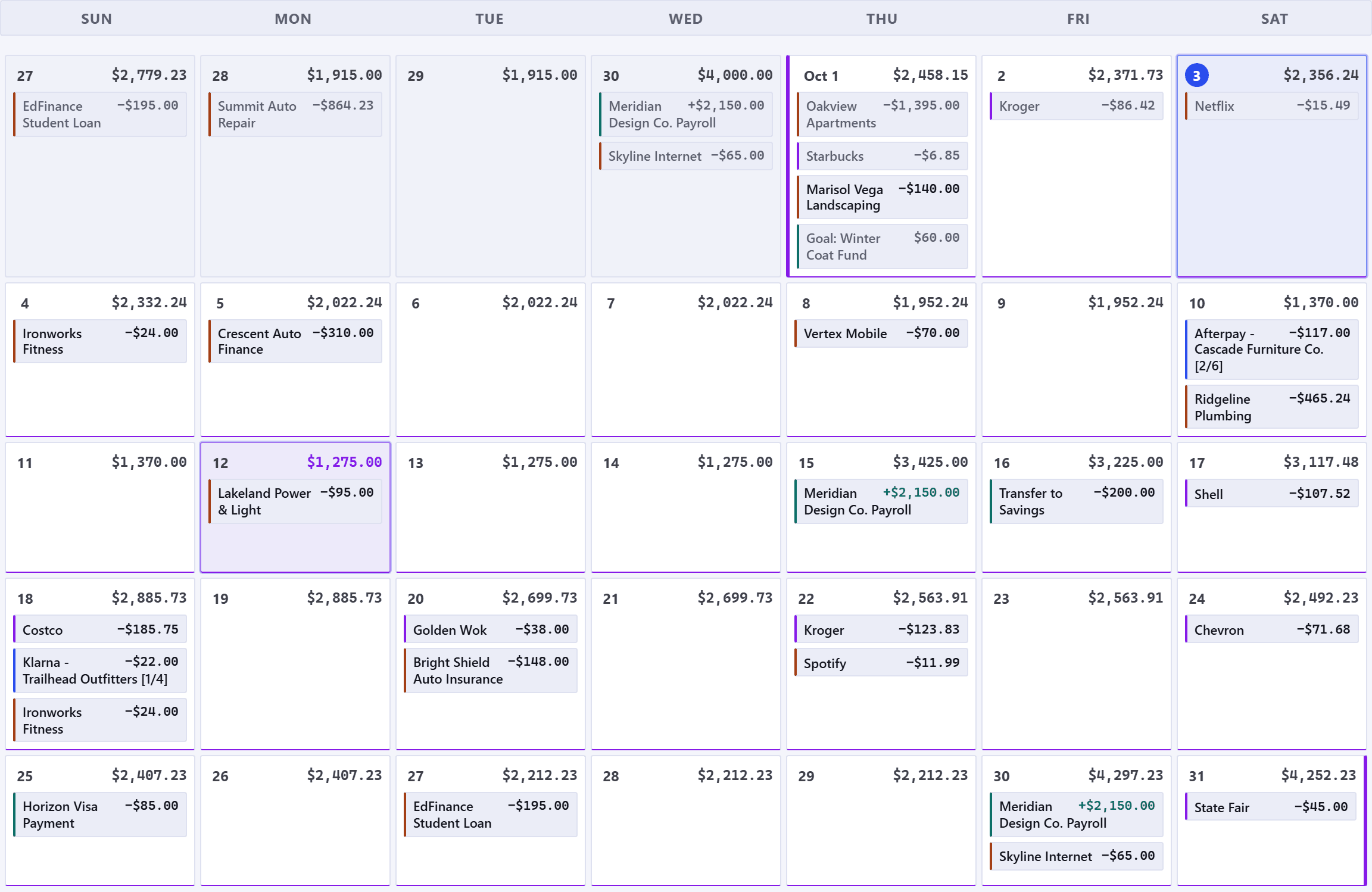
Log unplanned spending with the Quick Entry bar, or schedule recurring bills and paychecks once. Each account's calendar marks its lowest day.

The quick ledger entry bar. Its own subtitle reads: for unplanned spending you didn't already have scheduled, coffee, gas, incidentals, saves as Cleared automatically unless you pick a future date. One row holds the date, a payee, an amount, an account, a category and a tag, then a plus to create a new tag, a Save button and Cancel, with expense, income and transfer buttons and a recurring checkbox above the row at the right. Under the date a small line reads WILL SAVE AS CLEARED, and a Notes field runs beneath the row.The quick ledger entry bar. Its own subtitle reads: for unplanned spending you didn't already have scheduled, coffee, gas, incidentals, saves as Cleared automatically unless you pick a future date. One row holds the date, a payee, an amount, an account, a category and a tag, then a plus to create a new tag, a Save button and Cancel, with expense, income and transfer buttons and a recurring checkbox above the row at the right. Under the date a small line reads WILL SAVE AS CLEARED, and a Notes field runs beneath the row.
October on the Forecast Commander calendar, with the last days of September leading in. Every day carries its own running balance in the corner with the items that moved it listed underneath: the rent, Oakview Apartments at 1,395 dollars, on the first; a 2,150 dollar paycheck on the fifteenth and the thirtieth; and buy-now-pay-later installments labeled two of six and one of four. Today is circled, at 2,356 dollars 24, with a Netflix charge on it. The month's lowest balance, 1,275 dollars, sits on the twelfth, outlined, with the bill that brought it there, Lakeland Power and Light at 95 dollars. The month's biggest single charge after the rent, Ridgeline Plumbing at 465 dollars 24, sits on the tenth beside a furniture installment, and the State Fair ticket, 45 dollars, waits on the last day.October on the Forecast Commander calendar, with the last days of September leading in. Every day carries its own running balance in the corner with the items that moved it listed underneath: the rent, Oakview Apartments at 1,395 dollars, on the first; a 2,150 dollar paycheck on the fifteenth and the thirtieth; and buy-now-pay-later installments labeled two of six and one of four. Today is circled, at 2,356 dollars 24, with a Netflix charge on it. The month's lowest balance, 1,275 dollars, sits on the twelfth, outlined, with the bill that brought it there, Lakeland Power and Light at 95 dollars. The month's biggest single charge after the rent, Ridgeline Plumbing at 465 dollars 24, sits on the tenth beside a furniture installment, and the State Fair ticket, 45 dollars, waits on the last day.

Budgets that count what's already committed

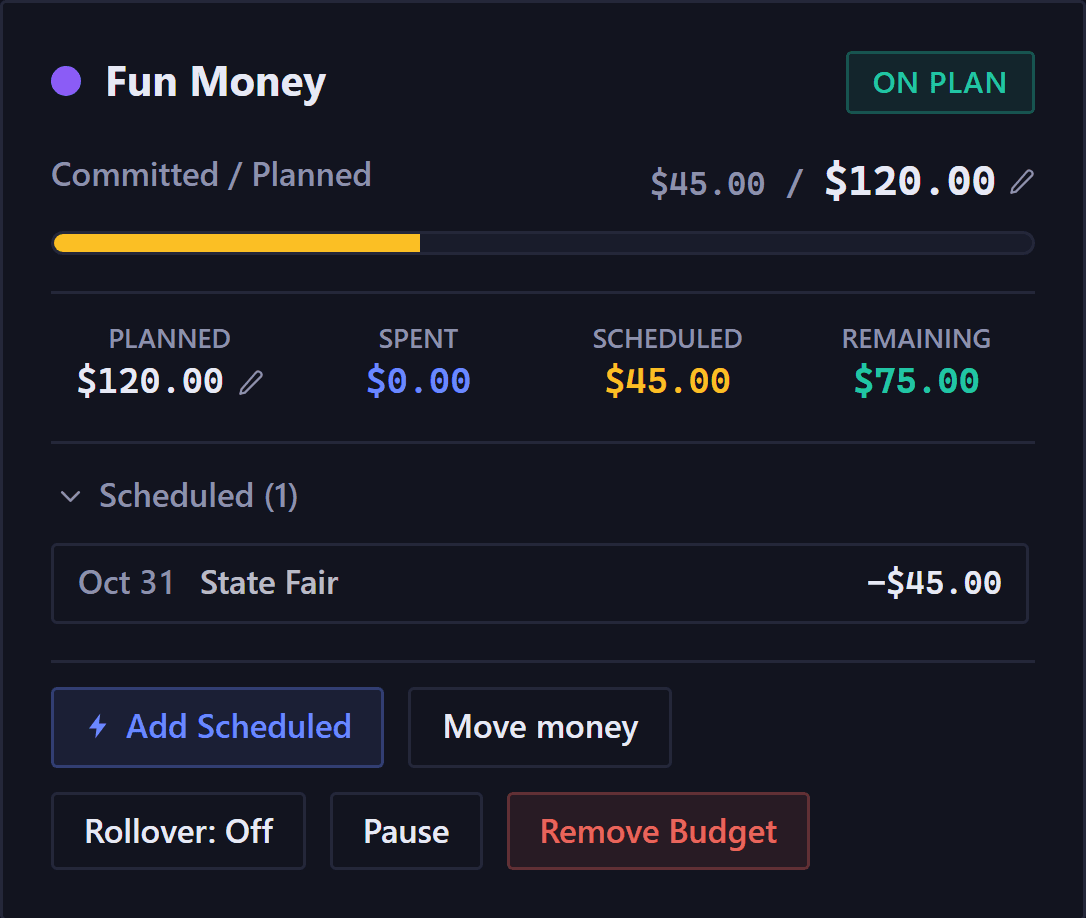
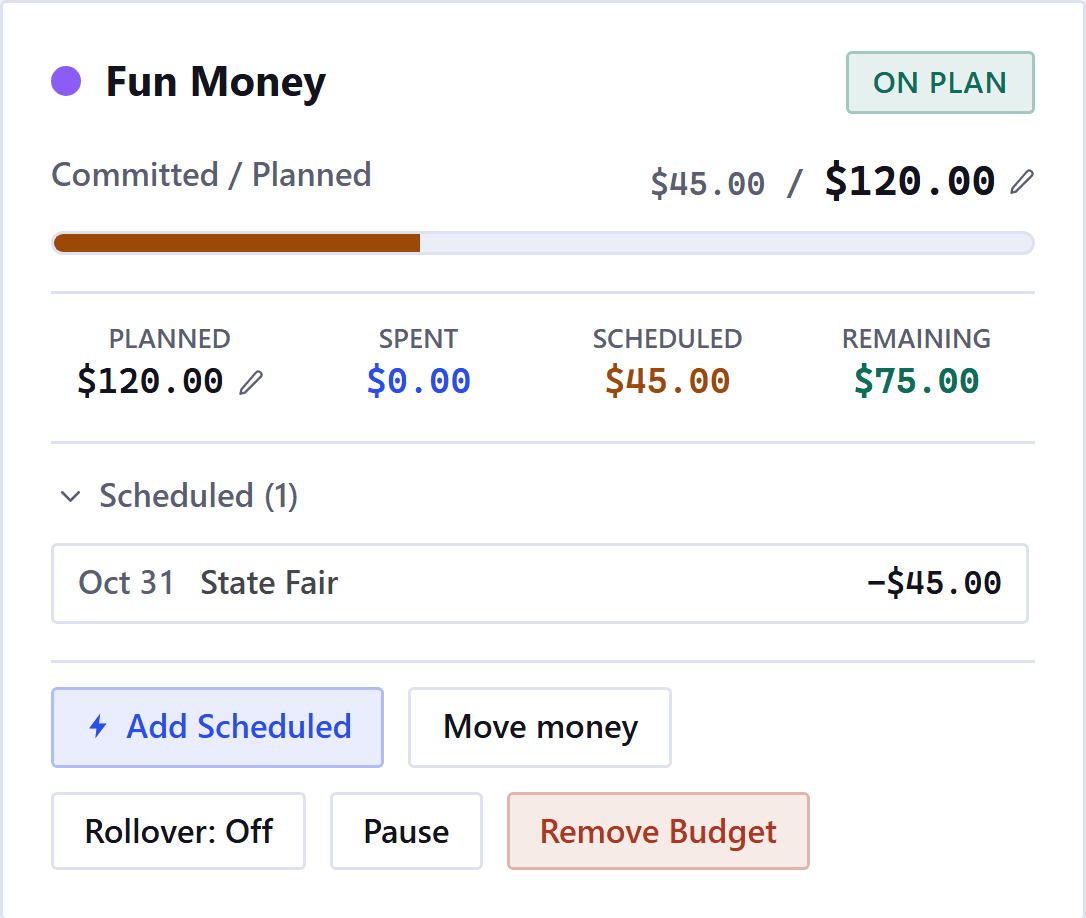
Most trackers ignore a purchase until it clears your bank, so the budget looks roomier than it is. Forecast Commander counts scheduled spending as soon as you enter it. In this Fun Money budget, your $45 ticket hasn't been charged yet, but it's already taken out of what's left. A budget that only sees cleared charges would show $45 more to spend.

Read the Budgets guide
One category from the budgets page. Fun Money, marked ON PLAN. Its bar is labeled Committed slash Planned and reads 45 dollars against 120 dollars planned, filled amber for what is scheduled, with nothing spent yet. A row of figures under it reads planned 120 dollars, spent 0 dollars, scheduled 45 dollars, remaining 75 dollars, and no Forecasted line. Below them an opened Scheduled list with one row, dated at the end of the month: State Fair, minus 45 dollars. Buttons for Add Scheduled, Move money, Rollover: Off, Pause and Remove Budget.One category from the budgets page. Fun Money, marked ON PLAN. Its bar is labeled Committed slash Planned and reads 45 dollars against 120 dollars planned, filled amber for what is scheduled, with nothing spent yet. A row of figures under it reads planned 120 dollars, spent 0 dollars, scheduled 45 dollars, remaining 75 dollars, and no Forecasted line. Below them an opened Scheduled list with one row, dated at the end of the month: State Fair, minus 45 dollars. Buttons for Add Scheduled, Move money, Rollover: Off, Pause and Remove Budget.

A year of cash flow on a single screen

The Year Wall shows every day of the next year as a square. Darker shades highlight tighter balances, while lighter shades show breathing room above your safety floor. Toggle into 3D to see your balances rise and fall, or drag the purchase slider to find the first day a big expense fits without dropping below your safety floor.

The Year Wall's four figures across its top: the lowest point in view, 1,275 dollars, with its date; the clearance versus the floor, 275 dollars above your floor; days under the floor, zero of the 364 in view; and the lowest week, 496 dollars, in amber, with the week it falls in.The Year Wall's four figures across its top: the lowest point in view, 1,275 dollars, with its date; the clearance versus the floor, 275 dollars above your floor; days under the floor, zero of the 364 in view; and the lowest week, 496 dollars, in amber, with the week it falls in.
The Year Wall's legend: a red swatch for under the floor, a ramp from dark to pale running from tighter to more room, a hatched swatch for the days past day 90, and a blue-outlined swatch for today.The Year Wall's legend: a red swatch for under the floor, a ramp from dark to pale running from tighter to more room, a hatched swatch for the days past day 90, and a blue-outlined swatch for today.
Drag to try an amount.

The Year Wall as it appears in the app, then in 3D. Its year is built from the demo account's schedule.

Try a purchase or a faster payoff before you commit

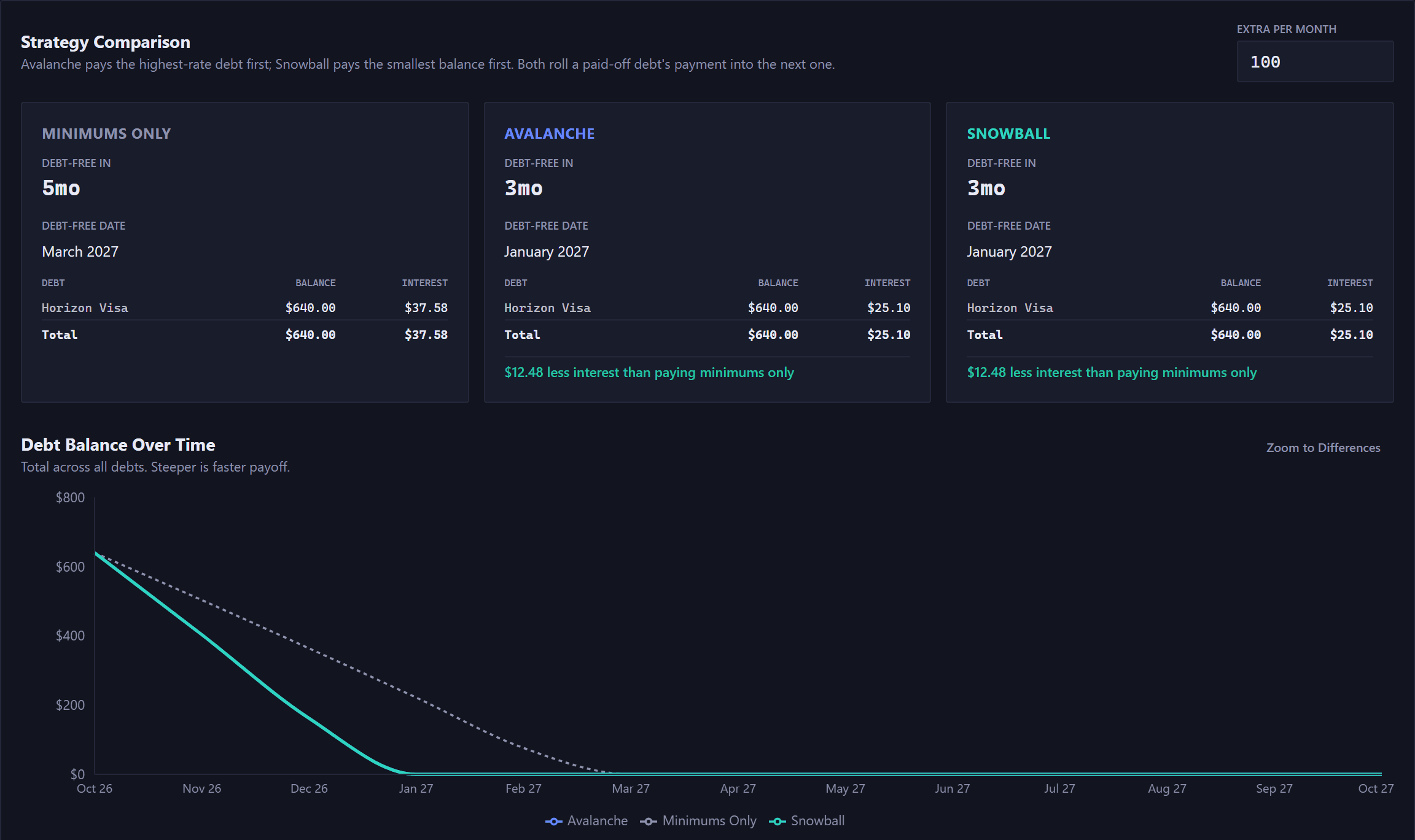
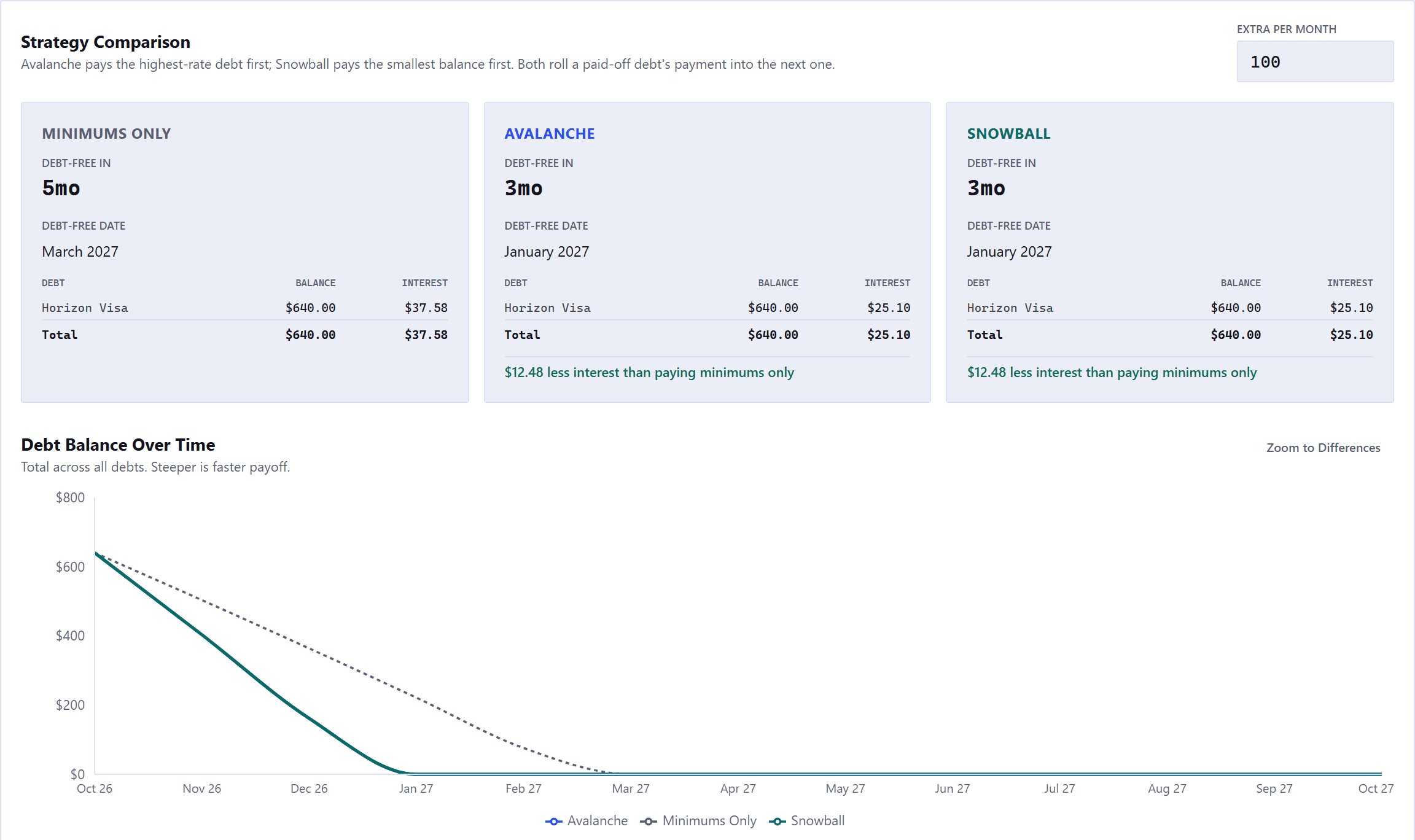
It all works from the accounts you already have, so there's nothing to retype. Forecast Commander works out the first day a big-ticket purchase fits above your safety floor, and compares Avalanche and Snowball: the month you'd be debt-free and the interest you'd pay, to the cent.

Read the Scenarios guide
The affordability panel on the Scenarios page, headed When can I afford this. An Amount field reading 1000, a Shape select reading One purchase, and a Find the date button. Beneath them, the answer in green: the first date from which you can cover this without touching your floor.The affordability panel on the Scenarios page, headed When can I afford this. An Amount field reading 1000, a Shape select reading One purchase, and a Find the date button. Beneath them, the answer in green: the first date from which you can cover this without touching your floor.
Strategy Comparison with an Extra Per Month field set to 100. Three cards: Minimums Only, debt-free in 5 months, with the month named, Horizon Visa at a 640 dollar balance and 37 dollars 58 interest; Avalanche, 3 months, two months sooner, 25 dollars 10; and Snowball, the same 3 months and the same month, 25 dollars 10. Avalanche and Snowball each add a green line reading 12 dollars 48 less interest than paying minimums only. Below them the Debt Balance Over Time chart, with a Zoom to Differences button. Every line starts today at the 640 dollars owed: Avalanche and Snowball are drawn as one solid line that reaches zero three months out, and the dotted Minimums Only line reaches it two months later.Strategy Comparison with an Extra Per Month field set to 100. Three cards: Minimums Only, debt-free in 5 months, with the month named, Horizon Visa at a 640 dollar balance and 37 dollars 58 interest; Avalanche, 3 months, two months sooner, 25 dollars 10; and Snowball, the same 3 months and the same month, 25 dollars 10. Avalanche and Snowball each add a green line reading 12 dollars 48 less interest than paying minimums only. Below them the Debt Balance Over Time chart, with a Zoom to Differences button. Every line starts today at the 640 dollars owed: Avalanche and Snowball are drawn as one solid line that reaches zero three months out, and the dotted Minimums Only line reaches it two months later.

Set up from a bank statement

Open a CSV from your bank and Forecast Commander finds the bills and paychecks that repeat, and suggests an average for bills that vary. The file is read in your browser and never uploaded.

Buy now, pay later

Enter the total and the number of payments, and every installment lands on its date, with a count of how many are paid.

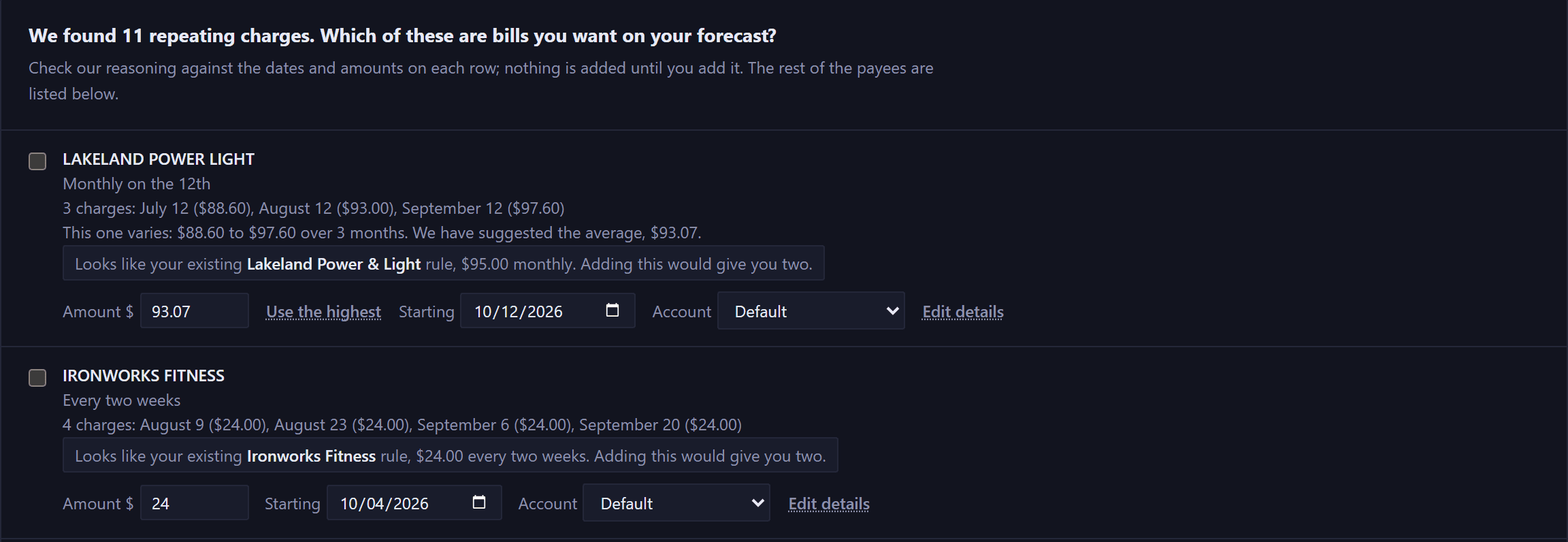
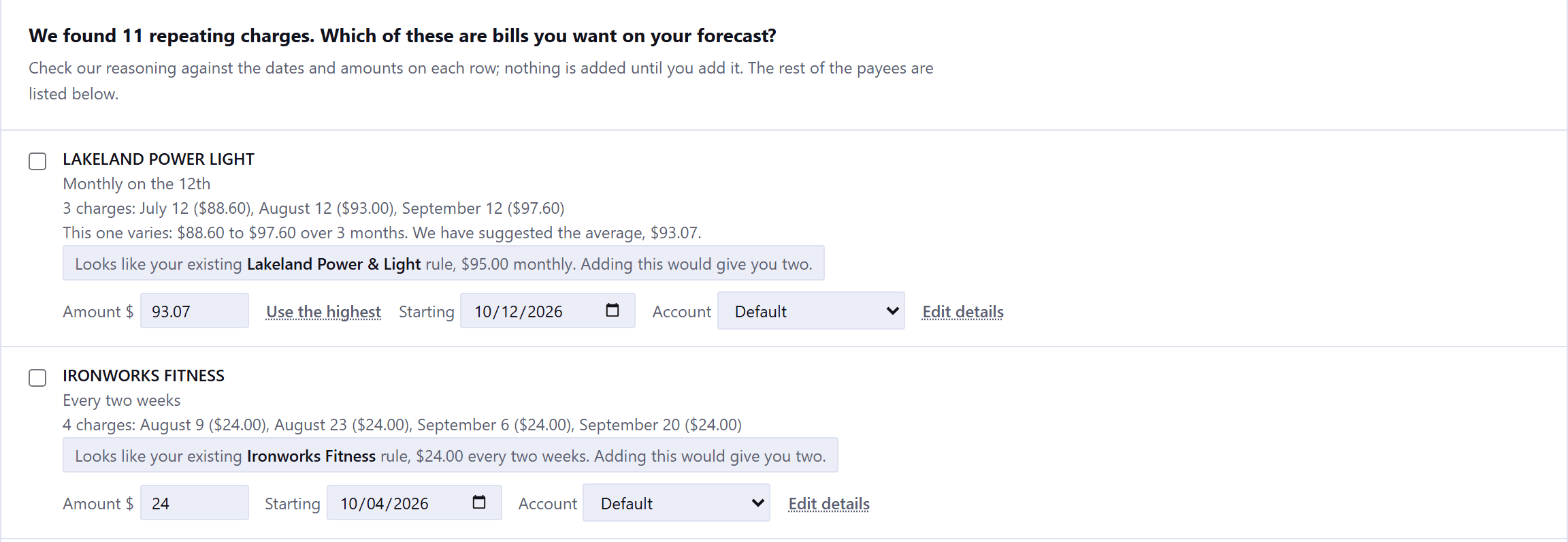
Two rows from the statement reader, under its question: we found 11 repeating charges, which of these are bills you want on your forecast? Lakeland Power and Light, monthly on the twelfth, three charges listed on the twelfth of three consecutive months at 88 dollars 60, 93 dollars, and 97 dollars 60, then a line reading: this one varies, 88 dollars 60 to 97 dollars 60 over 3 months, we have suggested the average, 93 dollars 07. A note says it looks like an existing 95 dollar monthly rule and adding this would give you two. Beside the suggested amount sit a Use the highest link, a starting date and an account. Underneath, Ironworks Fitness, every two weeks, four charges of 24 dollars, with its own duplicate note.Two rows from the statement reader, under its question: we found 11 repeating charges, which of these are bills you want on your forecast? Lakeland Power and Light, monthly on the twelfth, three charges listed on the twelfth of three consecutive months at 88 dollars 60, 93 dollars, and 97 dollars 60, then a line reading: this one varies, 88 dollars 60 to 97 dollars 60 over 3 months, we have suggested the average, 93 dollars 07. A note says it looks like an existing 95 dollar monthly rule and adding this would give you two. Beside the suggested amount sit a Use the highest link, a starting date and an account. Underneath, Ironworks Fitness, every two weeks, four charges of 24 dollars, with its own duplicate note.
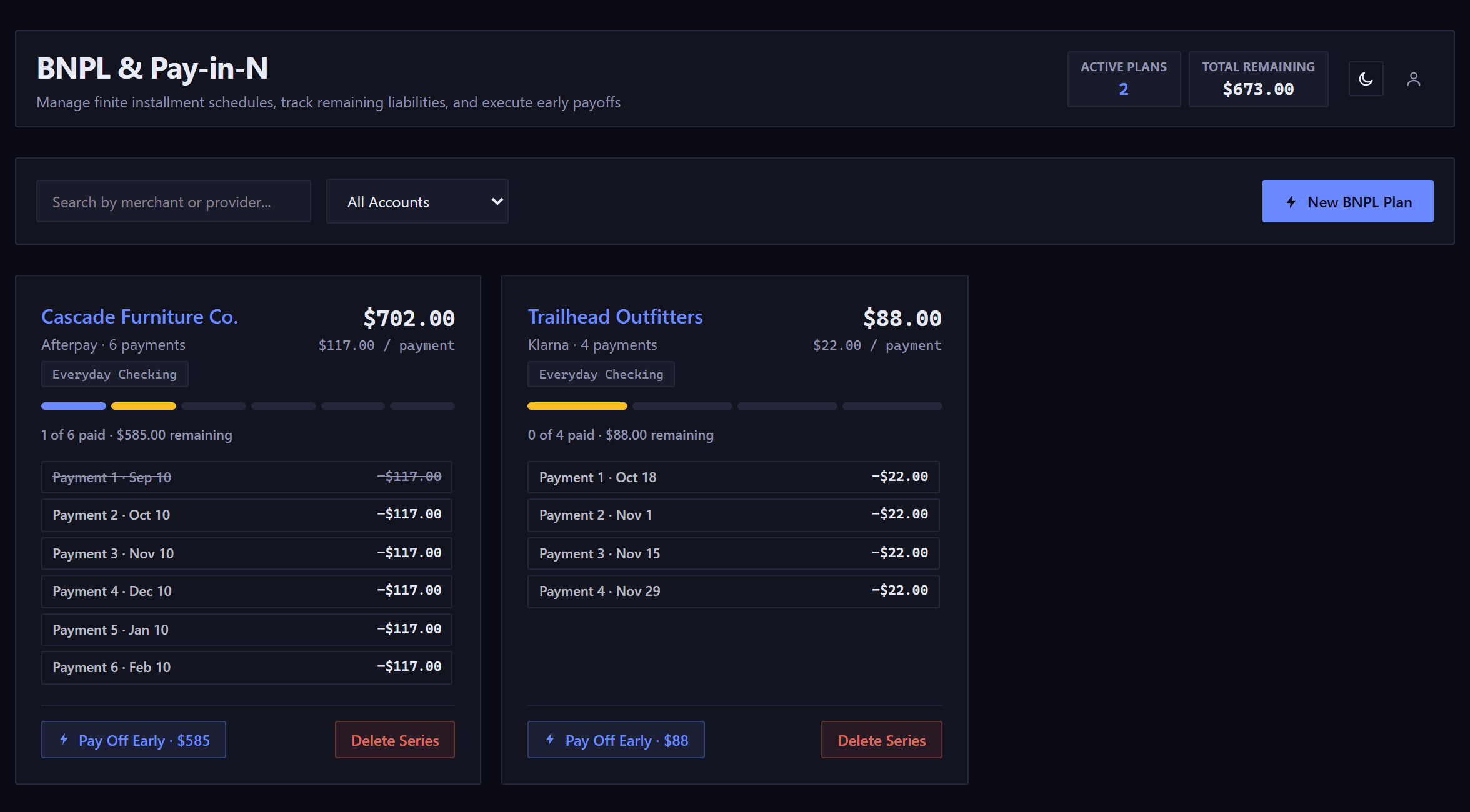
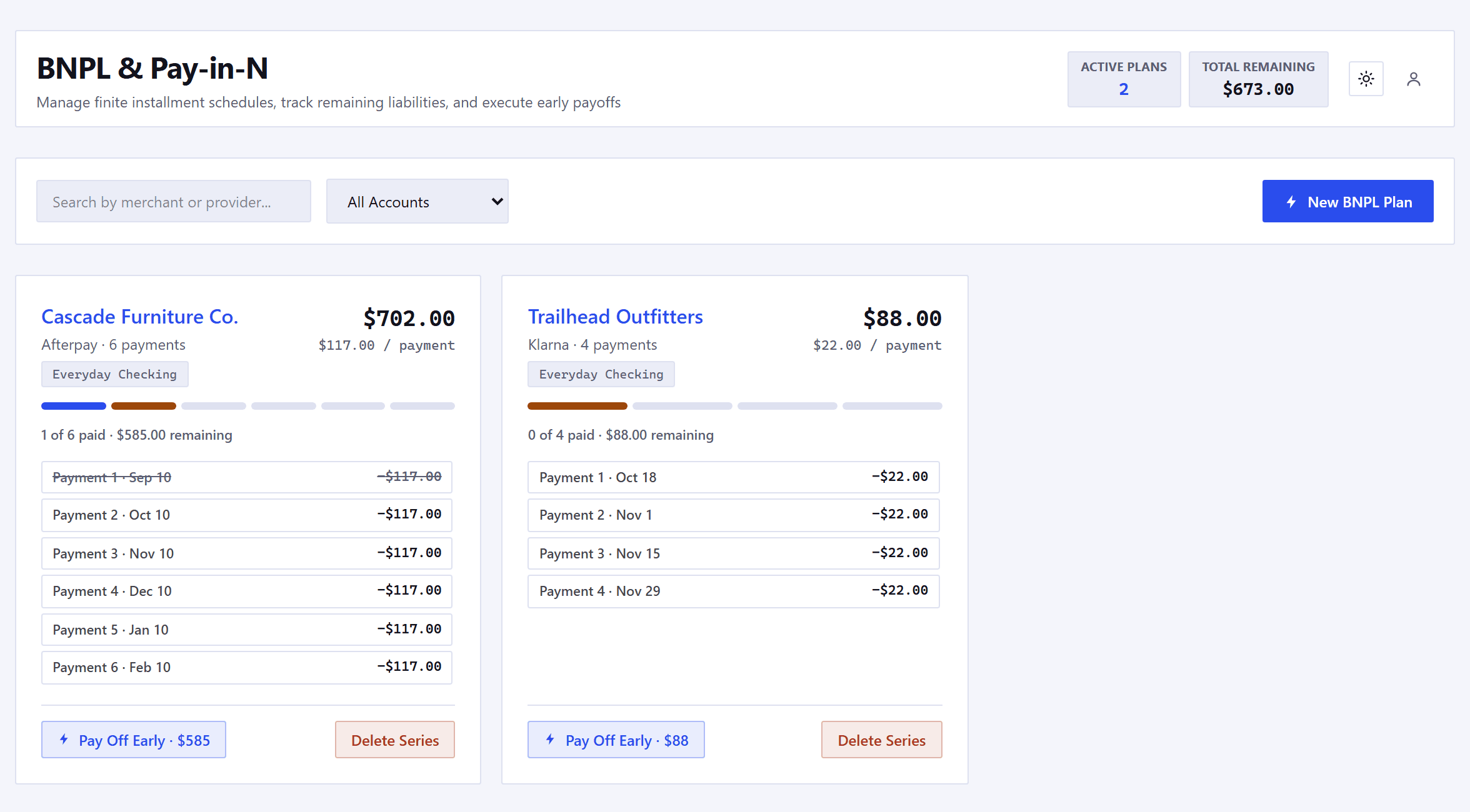
Two buy-now-pay-later plans side by side, under the page's heading and its search box. Cascade Furniture Co. through Afterpay: 702 dollars over six payments of 117 dollars, one of six paid and 585 dollars remaining, with every payment listed by date, six of them a month apart, and the first struck through. Trailhead Outfitters through Klarna: 88 dollars over four payments of 22 dollars, none paid yet and 88 dollars remaining, its four payment dates listed two weeks apart. Each card names the paying account and offers Pay Off Early, carrying what is left to pay, and Delete Series. Above them, active plans 2 and total remaining 673 dollars.Two buy-now-pay-later plans side by side, under the page's heading and its search box. Cascade Furniture Co. through Afterpay: 702 dollars over six payments of 117 dollars, one of six paid and 585 dollars remaining, with every payment listed by date, six of them a month apart, and the first struck through. Trailhead Outfitters through Klarna: 88 dollars over four payments of 22 dollars, none paid yet and 88 dollars remaining, its four payment dates listed two weeks apart. Each card names the paying account and offers Pay Off Early, carrying what is left to pay, and Delete Series. Above them, active plans 2 and total remaining 673 dollars.

Questions before you start

How does the trial work?

Thirty-five days with every feature and no card on file. We email you once, seven days before it ends.

What happens if I don't subscribe?

Your account turns read-only. Everything stays readable and you can download a backup for ninety days, then the account and its data are deleted.

Do I have to connect my bank?

No. You type your bills and paychecks, or import a CSV statement, which is read in your browser and never uploaded. How we handle security

Can I take my data with me?

Yes. Settings has a CSV export and a full encrypted backup, and you can delete your account there too.

Founder rate

$45a year$65regular

$3.75 a month, billed $45 once a year.

64days left

The founder window closes December 6, 2026.

  • 35 days free, no credit card required. Long enough to watch a month roll over.
  • Your price never rises while your subscription stays active.
  • Everything: Forecast, Budgets, Scenarios, Debt payoff and Goals.
  • No bank connections. No credentials handed over, ever.
  • Cancel any time from inside the app.
Start your 35-day trial

The rate is claimed by subscribing before December 6 from Settings, Billing inside the app.