Budgeting with Claude
Forecast Commander is a complete budgeting app with the forecast built in: budgets by your method, bills and paychecks on a calendar, debt payoff, goals and scenarios. You can also connect it to Claude. Then you can ask about your money in an ordinary conversation, and have Claude add transactions, bills and budgets for you.
What you can ask
Claude reads the same numbers you see in the app: your forecast, balances, upcoming bills, budgets, categories, transactions and spending. So you can ask the questions you'd otherwise answer by clicking around:
- "What's my lowest balance this month?"
- "Can I afford a $400 car repair before payday?"
- "How much have I spent eating out this month?"
- "Show me October as a calendar."
When you ask how an account looks, Claude can show the same summary as the top of your Command Center, with a button that opens that account in the app. If you ask for a chart or a calendar, Claude draws it from the numbers it read. The numbers come from your account, and the drawing is Claude's.
Having Claude add things for you
You can photograph a receipt and ask Claude to add it. Claude reads the store, the date and the total off the receipt, then suggests a category. It asks which account paid, because a receipt doesn't say. If you left a tip, tell it the amount you actually paid. One receipt can also be split across categories, like groceries and household.
You can do the same with anything you tell it, like "Add an Afterpay plan for Walmart, 4 payments, $225.35 in all, starting today." Depending on the access you give it, Claude can also create categories, set budget amounts, and add or change bills, subscriptions and paychecks.
Before anything is saved, Claude checks the change with Forecast Commander. The check shows what would be saved and flags a possible duplicate already on the account. For a purchase, it also says what's left in that category's budget and shows your lowest forecast balance over the next 90 days, before and after. Where Claude can show it, the check comes back as a card in the chat. By default, nothing is saved until you press Save on it. Most changes can be undone for 7 days, from the chat or from the app.
Connecting Claude
- Open Connected apps under Settings in Forecast Commander, and copy the address shown there.
- Then in Claude, go to Settings, then Connectors, and choose Add custom connector. Name it Forecast Commander and paste the address.
- Choose Connect, and sign in to Forecast Commander if you aren't already.
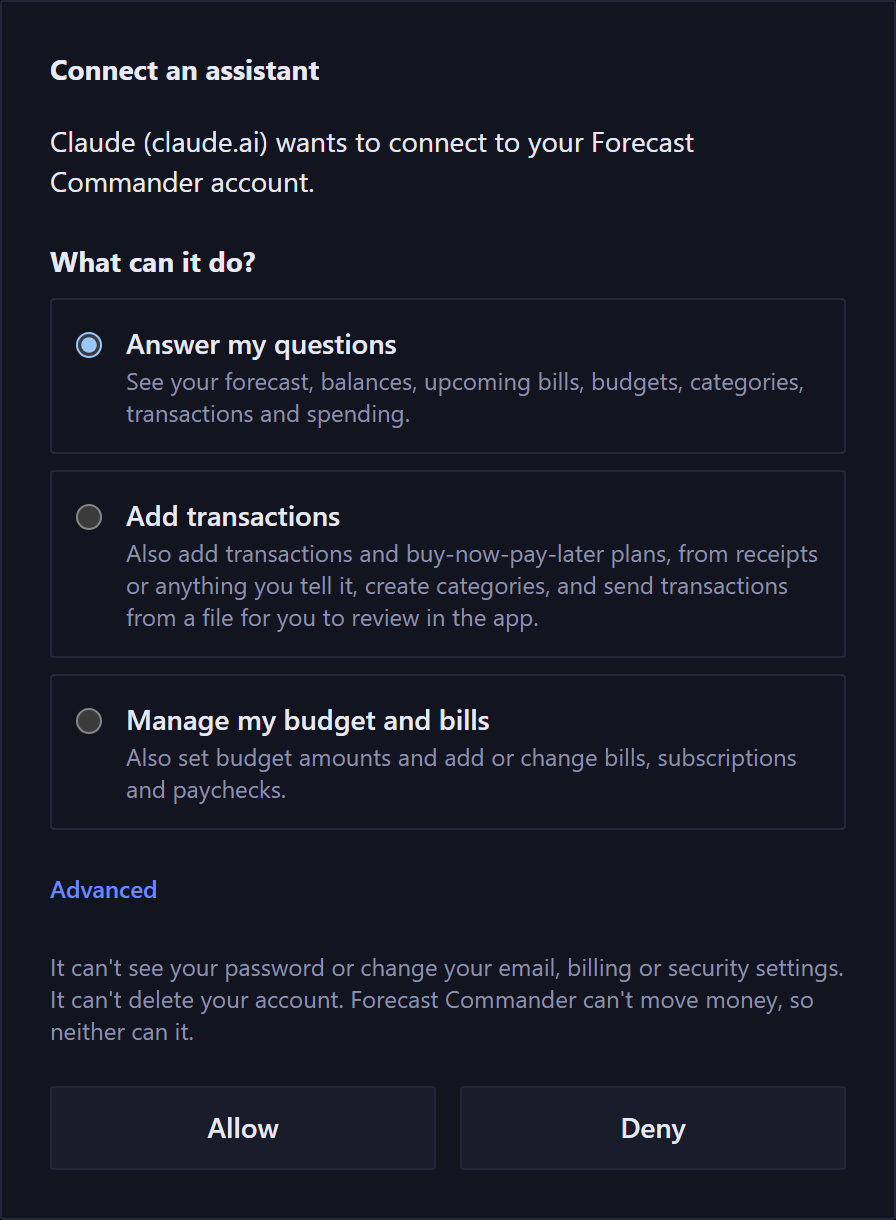
- Choose what Claude can do, then Allow.
Once you've added it in Claude on the web or the desktop app, it works in Claude's phone app too.
What it can see and change
When you connect, you choose one of three levels:
- Answer my questions: Claude can see your forecast, balances, upcoming bills, budgets, categories, transactions and spending.
- Add transactions: it can also add transactions and buy-now-pay-later plans, create categories, and send transactions from a file for you to review in the app.
- Manage my budget and bills: it can also set budget amounts and add or change bills, subscriptions and paychecks.
Whatever you choose, Claude can't see your password or change your email, billing or security settings. It also can't delete your account or move any money, since Forecast Commander has no way to move money. You can change the level later in Connected apps.
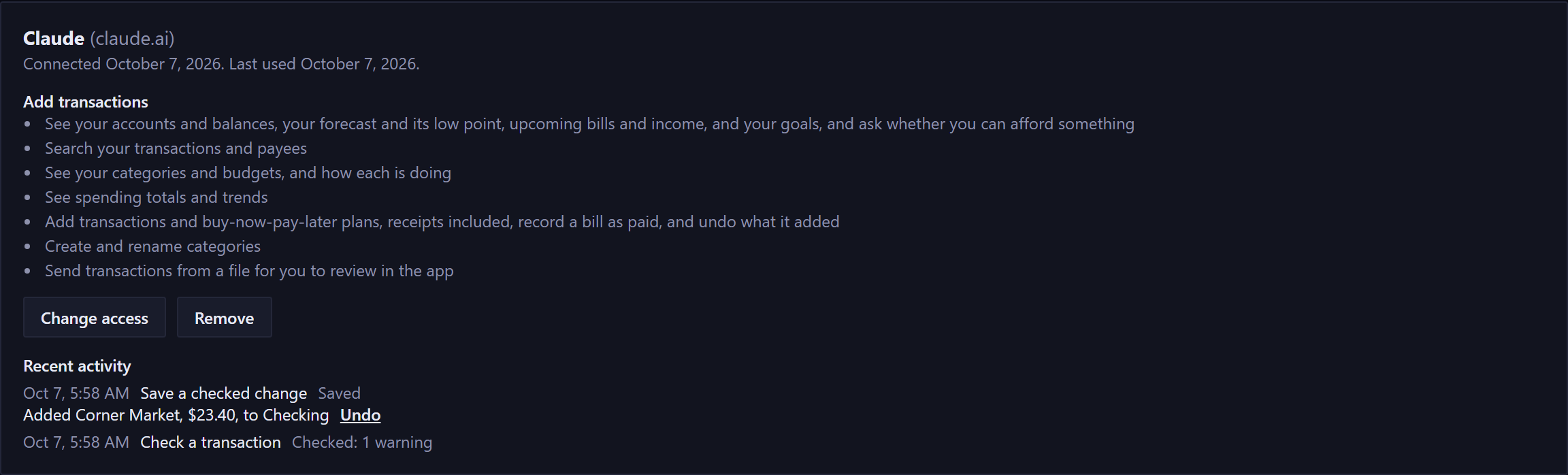
Connected apps also shows Claude's recent activity: what it asked for, what it changed, and an Undo beside each change. Transactions it added are marked Added by Claude on the Transactions page. To stop it, remove the connection there. Removing the connector in Claude alone doesn't take away its access.
Your data
Forecast Commander runs no AI. The forecast, the budgets and every number Claude reads are worked out the same way whether you use Claude or not.
Claude runs on its own company's service, under your account there, and that company keeps your conversations under its own terms. We don't see those conversations. It's worth checking Claude's data settings, including whether your chats can be used to train its models.
Forecast Commander never connects to your bank, so everything Claude reads is something you entered.
The trial is free for 35 days with no card. For every detail, read Using Forecast Commander in Claude.