Using Forecast Commander in Claude
Ask your own AI assistant about your forecast, budgets and spending, and have it add transactions, bills and budgets for you. Most changes can be undone for 7 days. Forecast Commander itself runs no AI.
The screenshots are live captures of a demo account.
Last updated
What it can do#
Once Claude is connected, you can ask it things like:
- "What's my lowest balance this month?"
- "Can I afford a $400 repair next week?"
- "How much did I spend on groceries in September?"
- "Add this receipt." (with a photo)
- "Add an Afterpay plan for Walmart, 4 payments, $225.35 in all, starting today."
- "Show me October as a calendar."
Claude can draw a chart or a calendar from the numbers it reads. The numbers come from your account. The drawing is Claude's.
Connecting Claude#
- In Forecast Commander, open Settings, then Connected apps, and copy the address shown there.
- In Claude, open Settings, then Connectors, and choose Add custom connector. Give it a name, like Forecast Commander, and paste the address.
- Choose Connect. If you aren't signed in to Forecast Commander, sign in.
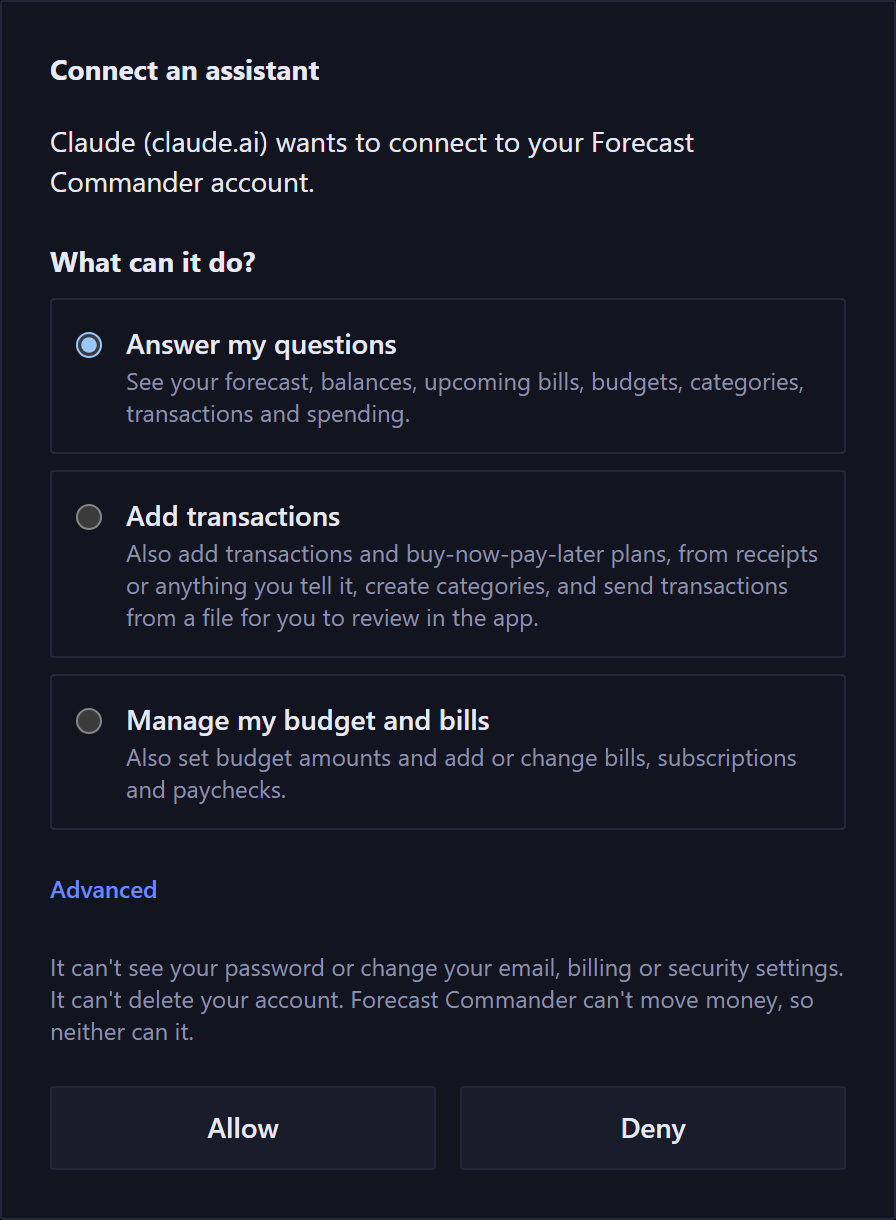
- Choose what Claude can do, then Allow.
A connector you add in Claude on the web or the desktop app also works in Claude's phone app.
What it can see and change#
You choose one of three when you connect:
- Answer my questions: see your forecast, balances, upcoming bills, budgets, categories, transactions and spending.
- Add transactions: also add transactions and buy-now-pay-later plans, from receipts or anything you tell it, create categories, and send transactions from a file for you to review in the app.
- Manage my budget and bills: also set budget amounts and add or change bills, subscriptions and paychecks.
Answer my questions is selected when the page opens. Advanced lists each permission on its own. A permission to change something keeps on the ones it needs to see what it's changing, and says why.
Whatever you choose, it can't see your password or change your email, billing or security settings. It can't delete your account, and it can't move money, because Forecast Commander can't either.
To change what it can do later, open Connected apps and choose Change access. It shows the same three choices.
What to tell it#
Claude asks for what's missing, and it helps to give it up front:
- A transaction: the amount, the date, the payee, and the account. Name a category if you want one. If you don't, it suggests the one you've used with that payee before, and says where the suggestion came from.
- A payment of a bill: which bill or scheduled payment, a buy-now-pay-later payment included, and the date you paid it.
- A buy-now-pay-later plan: the provider, the store, the total, how many payments, how often, the first payment's date, and the account that pays it.
- A bill, subscription or paycheck: the payee, the amount, how often, the first date, and the account.
- A budget: the category and the amount, and whether leftover money carries over.
- Categories: the names, and the parent for a subcategory.
What Claude checks before it saves#
When you ask for a change, Claude first checks it with Forecast Commander, and nothing is saved yet. The check finds:
- what would be saved, and which category and payee spelling it would use;
- a possible duplicate already on the account, including a scheduled one;
- for a transaction or a plan, what's left in that category's budget this period;
- for a transaction, a plan or a bill, the account's lowest forecast balance over the next 90 days, before and after.
Claude can save the change as soon as the check comes back, without asking you. It gets what the check found and can tell you about it. If Claude asks for permission to use Forecast Commander, that prompt comes from Claude, and it can't show you what the check found. To see a change before anything is saved, ask Claude to show it to you first. A check lasts 15 minutes. If something it depends on changes in the app in the meantime, the save is refused and the change has to be checked again.
Undo#
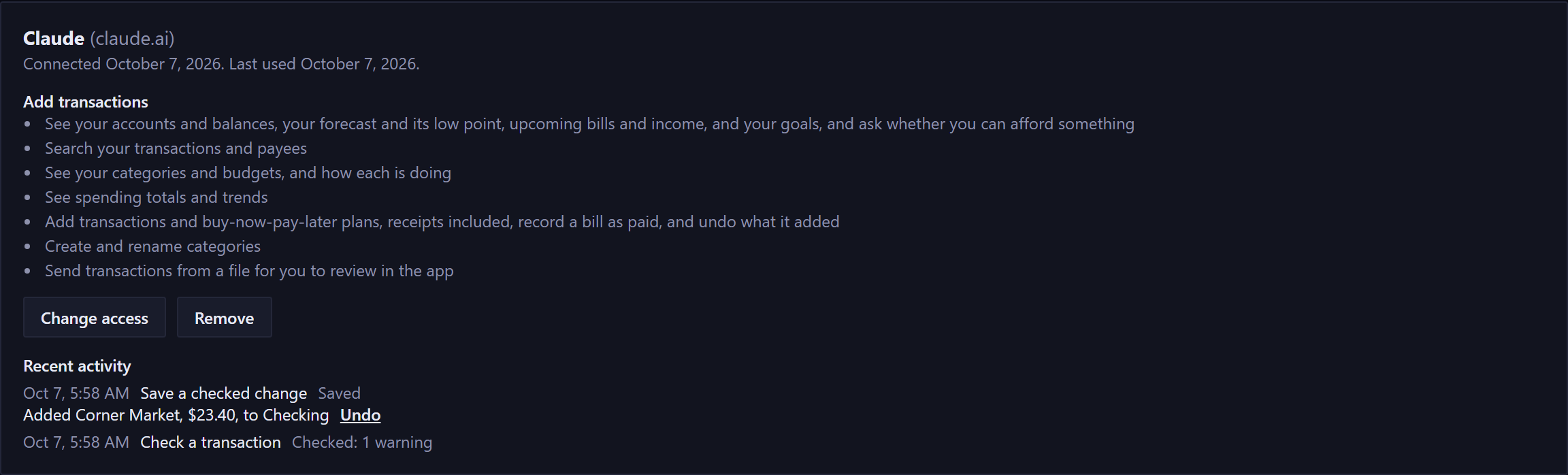
You can undo a change your assistant made for 7 days, from the chat or from Settings, Connected apps. If you've edited it since, undo tells you what changed and leaves it alone.
What undo does:
- a transaction or plan it added is removed;
- a bill payment it recorded is removed, and the bill shows as due again;
- a scheduled payment it recorded as paid goes back to scheduled, as it was;
- categories it created are removed, and renamed ones get their old names back;
- budgets go back to what they were. Earlier budget periods keep what they recorded;
- a bill it added is removed, a bill it changed gets its old details back, a bill it paused starts again, and a bill it resumed is paused again.
A category it created can't be undone once something uses it, and a bill it added can't be once a payment of it is recorded. After 7 days, change or delete it in the app.
Undo the latest change first. Something Claude changed twice can be undone one change at a time, newest first.
From the chat, Claude can undo only what it added. In Connected apps, you can undo any change on the list.
Receipts#
Take a photo of a receipt and ask Claude to add it. It reads the store, the date and the total, and suggests a category.
- Which card or account: a receipt doesn't say which of your accounts paid, so Claude asks. Forecast Commander has no field for a card number.
- Tips: a restaurant receipt's total may not include the tip. Tell Claude the amount you paid.
- Split receipts: one receipt can go to several categories, like groceries and household, as one transaction.
- US dollars only: an amount in another currency is refused.
A date after today is refused too. A future payment belongs in a bill.
Bills, subscriptions and paychecks#
Claude can add a bill, subscription or paycheck, change one, pause one, or resume one it or you paused. The check shows the next three dates and your account's lowest forecast balance, before and after.
If your budget periods follow your paycheck and a change moves your paydays, the check says when the periods start following the new dates.
These stay in the app:
- transfers, and card and loan payments, which belong to their accounts;
- schedules on particular weekdays;
- deleting a bill. Claude can pause one and resume it.
Buy-now-pay-later plans#
Claude can add a plan from a checking, savings, credit card or custom account. The check lists every payment with its date. The first is marked paid, and the payments add up to the total exactly.
Afterpay, Klarna's Pay in 4, PayPal Pay in 4 and Sezzle usually charge every 2 weeks, starting at checkout. Affirm is usually monthly. Tell Claude which yours is.
Paying a plan off early, or deleting one, stays in the app.
Importing transactions from a file#
Give Claude a bank statement or a file you exported from another app, and it can send the transactions in it to Forecast Commander. It sends them to accounts you already have, and they wait on the Import page for you to look over.
When your assistant sends you transactions from a file, they wait in Forecast Commander for up to 2 hours. Review them on the Import page, then import them or delete them. If you do neither, they're deleted after 2 hours. An import brings in history from before Forecast Commander knew that account, the same as importing from another app. For recent purchases, ask your assistant to add them one at a time.
What the review shows:
- who sent them, the time they arrived, and the time they'll be deleted;
- for each account: how many transactions and the dates they cover, that today's balance stays the same, and the balance your history will start at;
- the transactions themselves, with their categories, in a list you can open under the summary;
- any transactions left out, and why: a date in the future, an amount of zero, or a date on or after the day Forecast Commander already has for that account;
- transfers where only one side came in, and why;
- transactions that look like ones you've imported before, with a choice to skip them or keep them. Neither is picked for you.
Categories: ask Claude to categorize them. It can use your categories or create new ones, and it can change them while they wait. The review shows each transaction's category, and you can import them without categories.
Importing: Import N transactions brings them in, the same way an import from another app does. Your balance today stays put. Undo is in the Import page's list of imports, the same as any import.
If you leave partway: an import you start keeps going when you come back, until its 2 hours are up. Any transactions it hadn't brought in by then are deleted. What it already brought in stays. Choose Keep what's imported to finish with those, or undo the import from that list.
One at a time: while transactions from Claude are waiting, another import can't start. Import them or delete them first.
What Claude added#
A transaction Claude added reads Added by Claude on the Transactions page, and still does after you remove the connection. If you restore a backup, it reads Added by an assistant.
Once anything has been added that way, the Transactions page shows an Entry Filter. Choose Added by an assistant to see only those transactions.
Activity and removing a connection#
Each connection in Connected apps shows when it was connected and last used, what it can do, and its recent activity, newest first: what it asked for and what it changed, including anything it was refused. Activity is kept for 90 days.
Remove takes effect on its next question. Removing the connector in Claude doesn't remove its access here, so remove it in Connected apps. You can connect again from Claude anytime.
Reconnecting after you sign in with a code#
If you sign in to Forecast Commander with an authenticator code, your assistant may ask you to connect again. Choose Connect in your assistant. Nothing in your account changes, and its access stays what you chose.
If your account is read-only#
A read-only account can still answer Claude's questions. Adding or changing anything needs an active subscription, and Claude is told your account is read-only.
Limits#
There's a limit on how many questions, checks and saved changes a connection can make in an hour or a day. If Claude reaches one, it's told to wait, and the activity list shows it.
Claude's company and your data#
If you connect an AI assistant, such as Claude, it reads the parts of your account you allow and can make the changes you allow. The assistant runs on its own company's service, under your account with that company, and that company keeps your conversations under its own terms. We don't see or control those conversations. Check your assistant's data settings, including whether your conversations can be used to train its models.
It works without linking your bank. Everything your assistant reads is what you entered.
Where the AI runs#
Forecast Commander runs no AI. The forecast, the budgets and every number Claude reads are worked out the same way with or without an assistant.
If your assistant picks or creates categories, the choice is the assistant's, and you can change any of them later.
New here? See what Forecast Commander does.