Budgeting on irregular income

When money arrives when it arrives, budget the stretch between deposits.

Most budgeting advice assumes a paycheck on a schedule. Set up your categories for the month, fill them on the 1st, try not to go over. If you're paid by the job, on commission, in tips, or in a season that ends, that advice falls apart in the second sentence. There's no 1st. There's the day a client pays and the day the next one might.

The standard fix is to build up a month of expenses in the bank and pay yourself a salary out of it. That works, and if you have the buffer, do it. If you don't have it yet, read on.

Budget each deposit

When a deposit lands, the question is how far the money reaches: rent, the car, the phone, groceries for however many weeks, and then whatever is left has to last until the next deposit, whenever that is.

So the unit you budget is the stretch from one deposit to the next. Some stretches are 10 days. Some are six weeks. Each one has its own list of bills, the ones that fall inside it, and its own leftover.

In Forecast Commander that's a setting. The budget period can be monthly, twice a month, every two weeks, or your own interval, and the Command Center has a Start New Period button that ends the current period today and begins the next one. It exists for exactly this. Money came in, so a new period starts now, and the days before today close out as a period of their own.
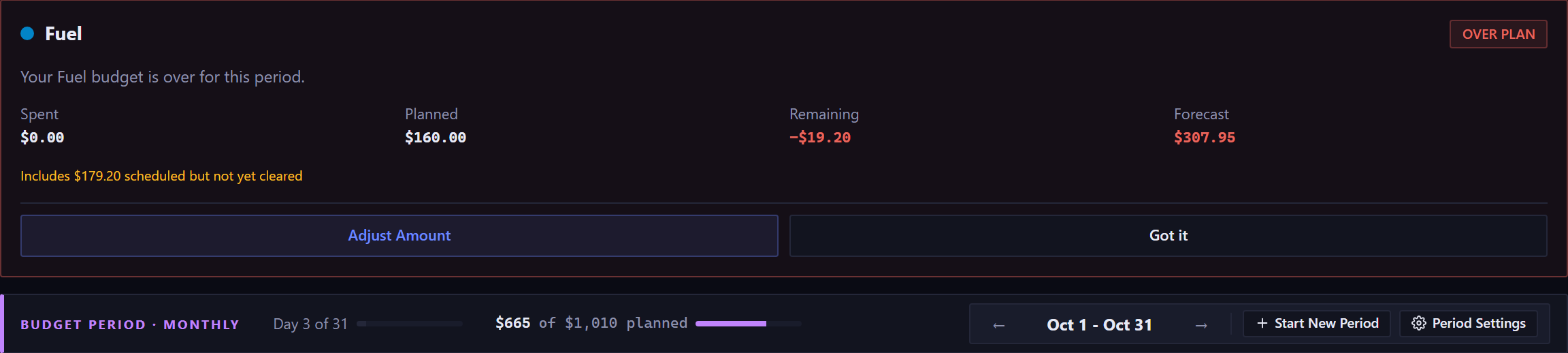
The budget period panel, opened. One alert card sits above the period bar: Fuel, chipped OVER PLAN in red, reading your Fuel budget is over for this period, with spent, planned, remaining shown as a negative in red, and a forecast above the plan, over a line saying how much of that forecast is scheduled but not yet cleared, and Adjust Amount and Got it buttons. Beneath it the bar reads BUDGET PERIOD, Monthly, how far into the period it is, and how much of the plan is committed against the total planned, with arrows either side of the period's month and buttons for Start New Period and Period Settings.The budget period panel, opened. One alert card sits above the period bar: Fuel, chipped OVER PLAN in red, reading your Fuel budget is over for this period, with spent, planned, remaining shown as a negative in red, and a forecast above the plan, over a line saying how much of that forecast is scheduled but not yet cleared, and Adjust Amount and Got it buttons. Beneath it the bar reads BUDGET PERIOD, Monthly, how far into the period it is, and how much of the plan is committed against the total planned, with arrows either side of the period's month and buttons for Start New Period and Period Settings.
The period bar, with Start New Period at the right for the day a deposit lands. Live capture, demo data.

Put the deposit on the calendar the day you know about it

The other half is the forecast. Every bill you know about goes on the calendar on its date. When a client agrees to pay on a Friday three weeks out, that goes on the calendar too, as income on that Friday. If it might slip, put it on the later date and be pleasantly surprised.

Then the top of the Command Center tells you what you want to know: how long you stay above your floor, and the day the balance is lowest.
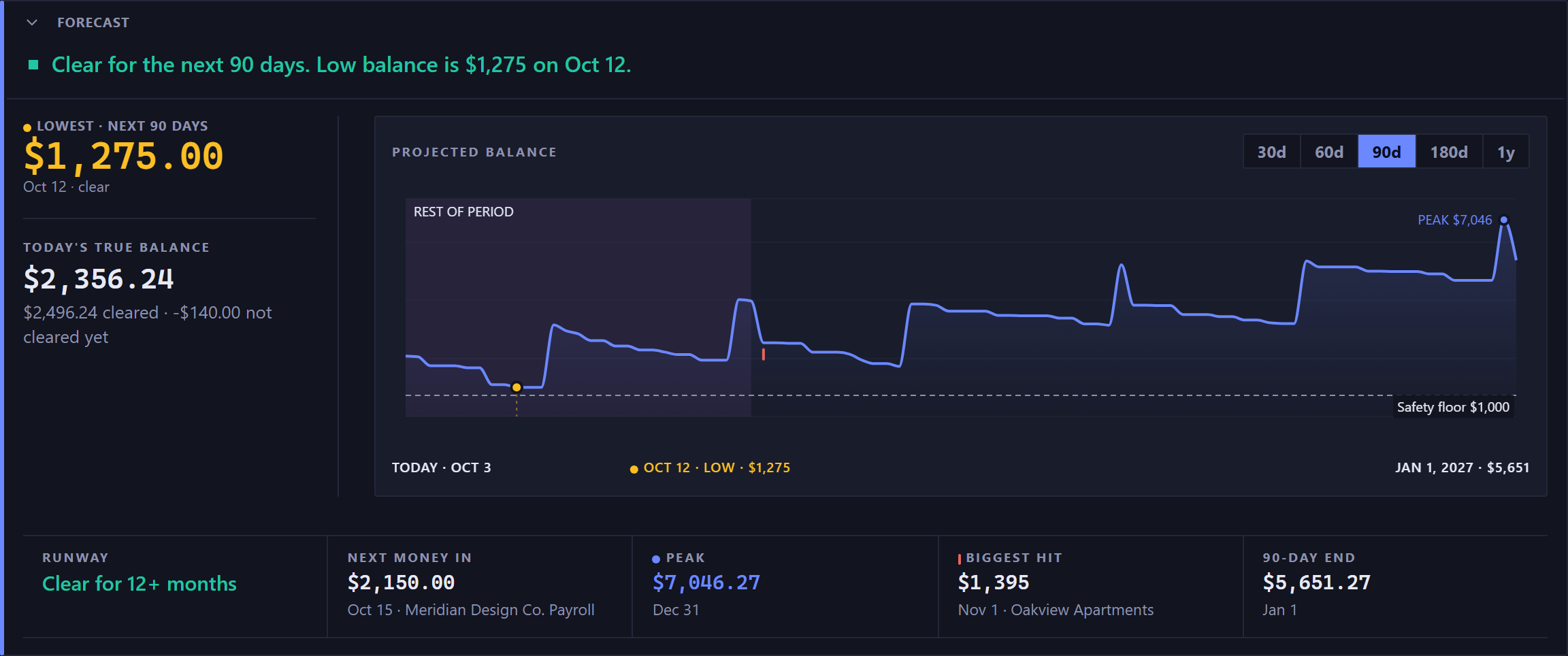
The forecast panel. A green square and a green sentence across the top read: clear for the next 90 days, then the low balance with its amount and its date. Below that the panel splits in two. A narrow left column carries the lowest point over the next 90 days, large and in the warning amber with an amber dot beside its label because the low is the thing to watch, with its date and the word clear; then under a rule and in smaller type, today's true balance, with a quieter line splitting it into what has cleared and what has not cleared yet. The rest of the width is the chart, labeled projected balance, with buttons for 30d, 60d, 90d, 180d and 1y and 90d selected. Its line starts at today, dips to an amber dot on the low early in the range, rises in steps on each payday and stays above a dashed safety floor with its amount marked; the peak is labeled in blue near the end, and a row beneath the chart names today, the low with its amount, and the end of the range. Across the bottom, a rail of five cells divided by hairlines, each one a small label over a figure, and every cell but runway with a quieter line of context beneath it: runway, clear for 12 plus months, in green; next money in, with its date and the payer beneath; the peak in blue with a blue dot, with its date; the biggest hit with a red tick, with its date and payee; and the 90 day end, the same figure the line ends on, with its date.The forecast panel. A green square and a green sentence across the top read: clear for the next 90 days, then the low balance with its amount and its date. Below that the panel splits in two. A narrow left column carries the lowest point over the next 90 days, large and in the warning amber with an amber dot beside its label because the low is the thing to watch, with its date and the word clear; then under a rule and in smaller type, today's true balance, with a quieter line splitting it into what has cleared and what has not cleared yet. The rest of the width is the chart, labeled projected balance, with buttons for 30d, 60d, 90d, 180d and 1y and 90d selected. Its line starts at today, dips to an amber dot on the low early in the range, rises in steps on each payday and stays above a dashed safety floor with its amount marked; the peak is labeled in blue near the end, and a row beneath the chart names today, the low with its amount, and the end of the range. Across the bottom, a rail of five cells divided by hairlines, each one a small label over a figure, and every cell but runway with a quieter line of context beneath it: runway, clear for 12 plus months, in green; next money in, with its date and the payer beneath; the peak in blue with a blue dot, with its date; the biggest hit with a red tick, with its date and payee; and the 90 day end, the same figure the line ends on, with its date.
The verdict, the low and its date, and the shape of the weeks ahead.

That day is your real deadline. If it's fine, take the slow week. If it isn't, that's the week to chase the invoice or take the smaller job.

What to do with a good month

Irregular income has good months, and the temptation is to spend them as if they'll repeat. What makes the thin months survivable is holding some of the good month back.

A budget category with rollover turned on does this without a second bank account: put more into it than you'll spend, and the part you don't spend carries into the next period and stops counting as money you can spend. There's a whole article on running one: Sinking funds without extra accounts. When a thin stretch comes, the money is there.

If you'd rather know how big a cushion you need before you start, read How much should you keep in checking? next.

The tax bill is a bill

If nobody withholds for you, the tax payment is the biggest irregular expense of the year and the easiest one to forget until it's due. Put it on the calendar as a bill on its date, quarterly if that's how you pay, with your best guess at the amount. The forecast will count it, and the low point will show you whether the weeks before it need to hold more back.

Start your 35-day trial

The trial is free for 35 days with no card, and the second thing setup asks is when money comes in. Read about starting a period early.

More from Learn