Payees
Every name you've paid, in one list, with one place to fix a spelling everywhere it appears.
The screenshots are live captures of a demo account.
Last updated
The payee list#
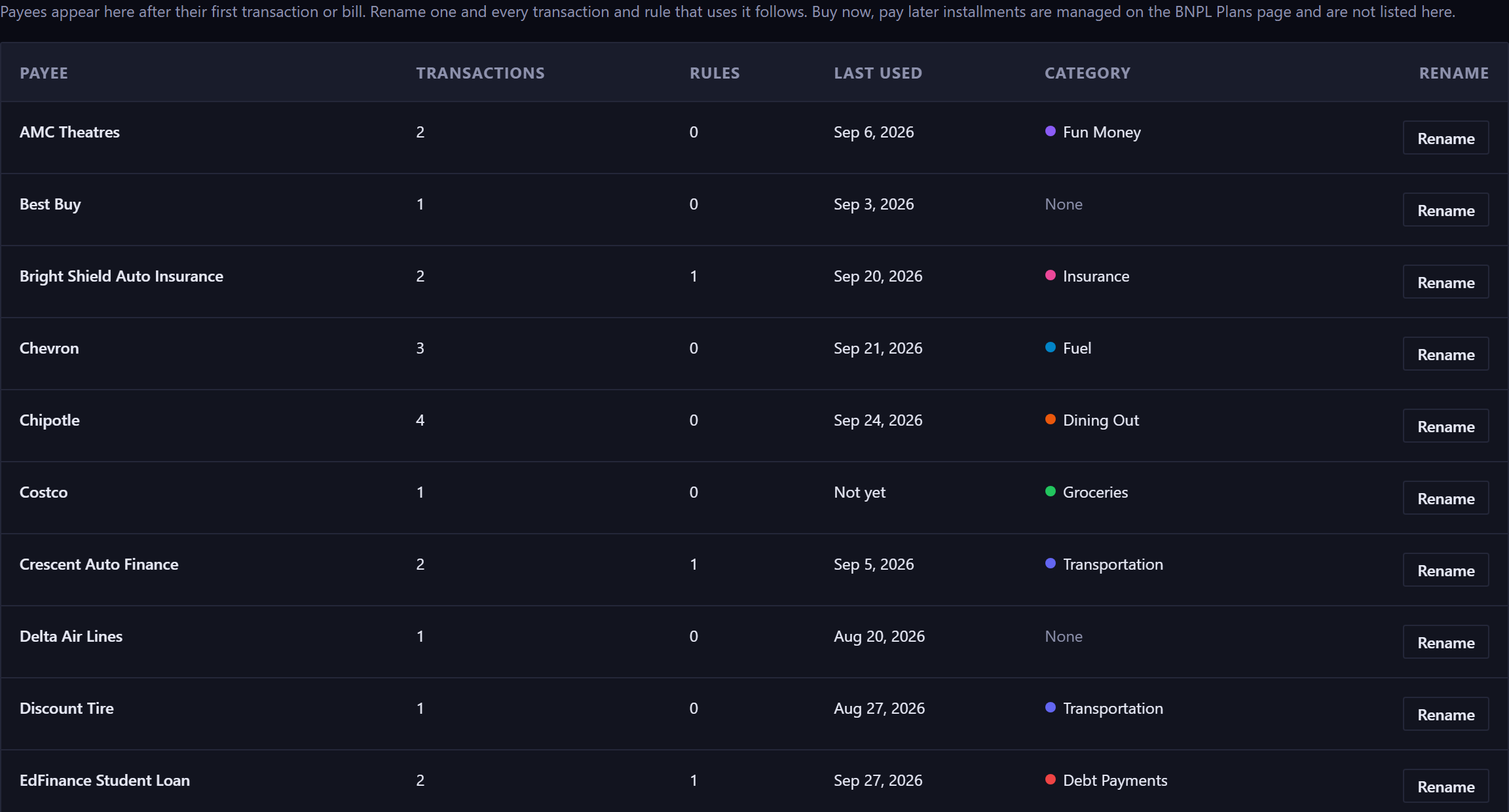
A payee is the name on a transaction or a bill. There's no separate list to keep: the moment you save something to Chevron, Chevron is a payee. The Payees page gathers them all, so you can see what you have and fix a name in one place.
Each row shows how many transactions and recurring rules use that payee, when you last paid it, and the category it usually falls under. For a transaction you split across categories, each line counts toward that usual category, not the transaction as a whole.
Last used means what has already happened. A payee whose only entries are still ahead of today, like a bill you've scheduled but not paid, reads Not yet.
Buy now, pay later installments aren't listed here, and they aren't offered while you type a payee. Each one's name carries its place in the plan, so manage them on the BNPL Plans page.
Renaming a payee everywhere#
Rename on a row opens an editor in place. Type the correct name and press Enter, or use Save. Escape cancels and changes nothing.
The change reaches every transaction and every recurring rule that used the old name, and the confirmation says how many of each moved: "Renamed 3 transactions and 1 rule to Chevron." The suggestions you get while typing a payee update at the same time, so the old spelling stops being offered.
A rename is reversible. Renaming it back restores exactly what you had.
Two spellings of the same name#
Capitalization alone doesn't split a payee. "Chevron" and "chevron" are one row, with a second line under the name: "Also spelled: chevron (1)". Renaming the row fixes every spelling in the group at once.
Different spellings, like "Car Payment" and "car pmt", are separate rows, since the app can't know they're the same. Renaming one to match the other merges them.
Merging two payees#
Rename a payee to a name that already exists and the two become one. That's often what you want after a typo, so it's allowed, but it asks first. The dialog names both payees and the counts that are about to move.
A merge can't be undone by renaming back: once both names read the same, nothing records which rows came from which name. Renaming to a name nothing else uses doesn't ask, since you can reverse that one.
Payees appear after their first use#
There's no Add button. Add a transaction or a recurring rule with the name, and the payee appears here on its own.
A payee stops being listed when nothing uses the name anymore.
The other place a payee changes#
The Transactions page can set a payee on a batch of selected rows, for when you want to relabel some transactions and not others.
It changes transactions only. Recurring rules keep the old name, so the next time one generates, the old spelling is back. To correct a name everywhere, use Rename on the Payees page.
New here? See what Forecast Commander does.