Skip to the page

On your phone

Put the app on your phone's home screen and it opens full screen. It takes a few taps, and there's one thing to expect the first time it opens.

The screenshots are live captures of a demo account.

Last updated

Adding it to your home screen#

Forecast Commander runs in the browser on any phone, and you can put it on the home screen so it opens full screen like an app.

iPhone and iPad
Open app.forecastcommander.com in Safari, tap Share, then Add to Home Screen, then Add.
Android
Open it in Chrome, tap the menu, then Add to Home screen or Install app.

The first time you open it#

The first time you open it from the home screen, you sign in again, with your authenticator code if you use one. The installed app keeps its own sign-in, separate from the browser's. After that it stays signed in the same way the browser does.

It doesn't work offline, and there's nothing to update: every time you open it, you have the current version.

What you'll see#

A tab bar runs along the bottom with the four places you go most, Command Center, Transactions, Budgets and Recurring, and More for the rest. The menu button sits top left on every screen, however far you've scrolled. Tap the Forecast panel's title to fold it away or open it again.

The bottom menu also appears on tablets and in narrower browser windows, anywhere under 1024 pixels wide. From there up, the sidebar takes over.
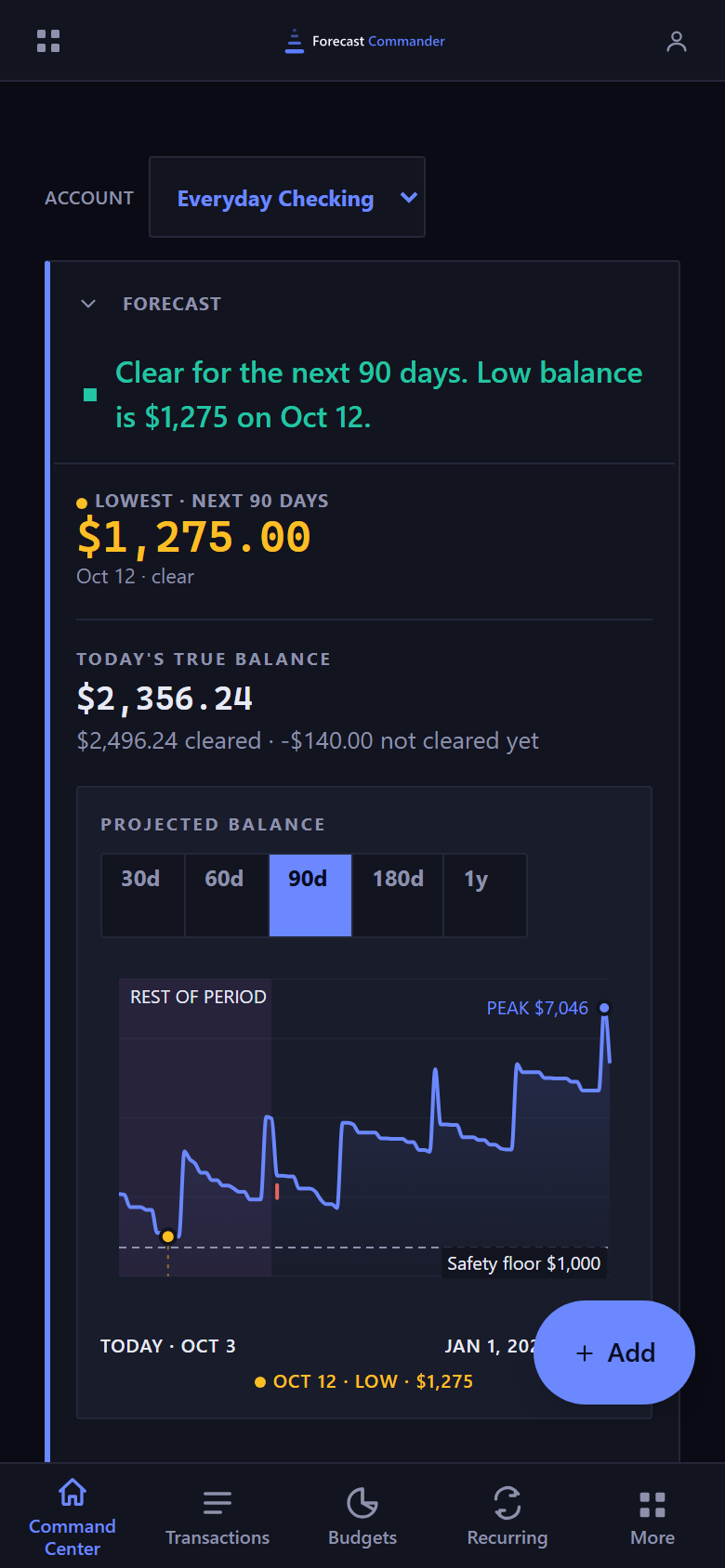
The Command Center on a phone, from the top of the page. A bar across the top with a menu button, the Forecast Commander wordmark and an account button, then an account selector naming the account in view. Below it the forecast panel, open: a green square and a green sentence: clear for the next 90 days, then the low balance with its amount and its date. Under that, the lowest point over the next 90 days, large and in the warning amber with an amber dot beside its label, with its date and the word clear; then beneath a rule, today's true balance with a quieter line splitting it into what has cleared and what has not cleared yet. Below them the chart, headed by its own label, with buttons for 30d, 60d, 90d, 180d and 1y and 90d selected: a line that dips to an amber dot on the low and rises in steps on each payday to a peak labeled in blue just before the end of the range, a dashed safety floor with its amount, and beneath the chart today with its date and the end of the range on one line, the end partly behind the floating Add button, with the low, its date and its amount on the line below. An Add button floats over the lower right corner, and the bottom navigation bar carries Command Center, Transactions, Budgets, Recurring and More, with Command Center selected.The Command Center on a phone, from the top of the page. A bar across the top with a menu button, the Forecast Commander wordmark and an account button, then an account selector naming the account in view. Below it the forecast panel, open: a green square and a green sentence: clear for the next 90 days, then the low balance with its amount and its date. Under that, the lowest point over the next 90 days, large and in the warning amber with an amber dot beside its label, with its date and the word clear; then beneath a rule, today's true balance with a quieter line splitting it into what has cleared and what has not cleared yet. Below them the chart, headed by its own label, with buttons for 30d, 60d, 90d, 180d and 1y and 90d selected: a line that dips to an amber dot on the low and rises in steps on each payday to a peak labeled in blue just before the end of the range, a dashed safety floor with its amount, and beneath the chart today with its date and the end of the range on one line, the end partly behind the floating Add button, with the low, its date and its amount on the line below. An Add button floats over the lower right corner, and the bottom navigation bar carries Command Center, Transactions, Budgets, Recurring and More, with Command Center selected.
The Command Center at phone width, with the tab bar along the bottom.

Tables on a phone#

On a phone each row of the transactions ledger, the recurring rules and the payees is a card: the payee and the amount on the first line, the smaller facts beneath them with their column names, and the row's buttons on their own line. Check a transaction and the batch bar appears above the tab bar, wherever you've scrolled. Clear drops the selection.
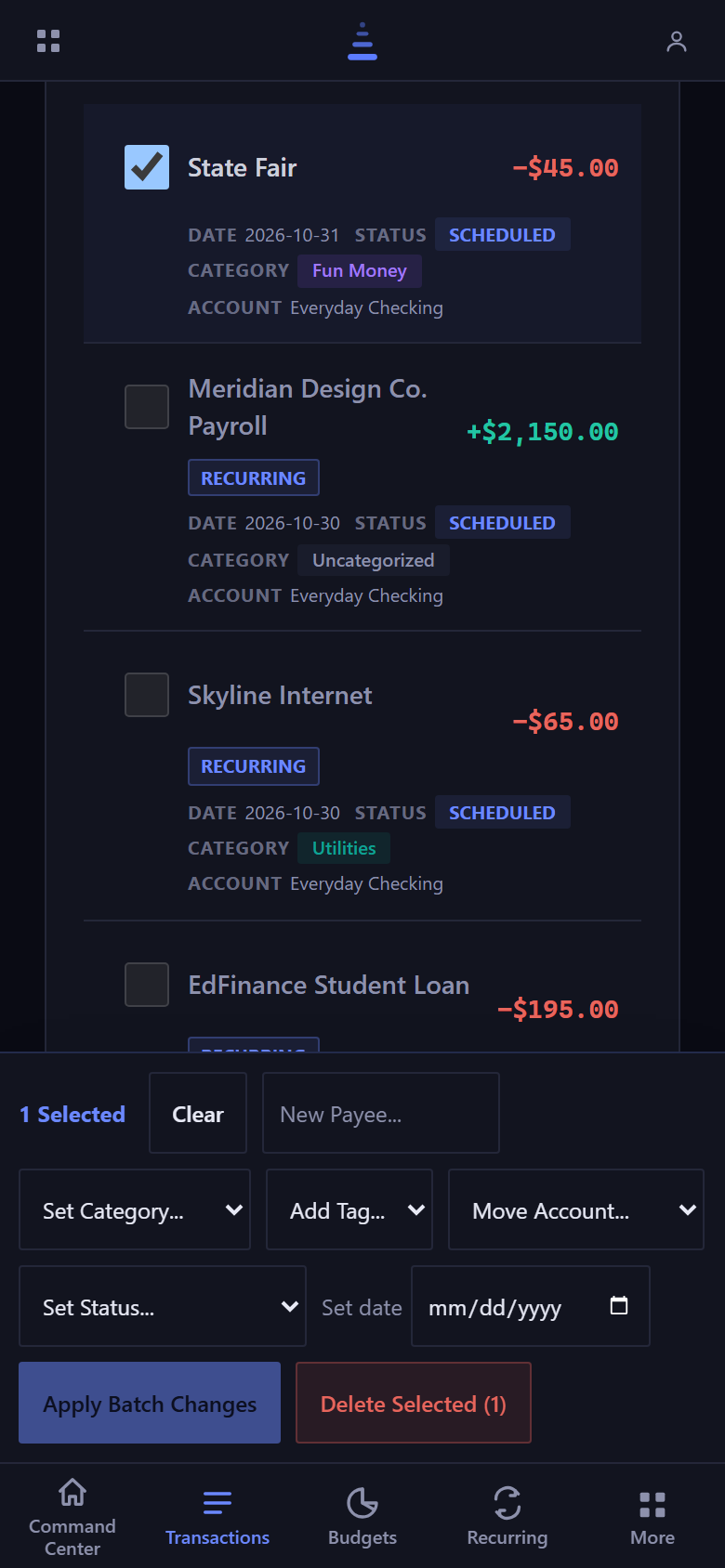
The Transactions page on a phone. Each row of the ledger is a card. The first is checked: State Fair, minus 45 dollars, with its date, the status Scheduled, the category Fun Money and the account Everyday Checking on small labeled lines below. Then Meridian Design Co. Payroll, plus 2,150 dollars, and Skyline Internet, minus 65 dollars, each tagged Recurring and reading Scheduled, in Uncategorized and Utilities, with the same kind of date, status, category and account lines, and EdFinance Student Loan, minus 195 dollars, cut off just above the batch bar. Fixed above the tab bar, the batch bar reads 1 Selected, with Clear, a New Payee field, Set Category, Add Tag, Move Account and Set Status menus, a date field, and the buttons Apply Batch Changes and Delete Selected. Along the bottom, the tab bar with Transactions highlighted.The Transactions page on a phone. Each row of the ledger is a card. The first is checked: State Fair, minus 45 dollars, with its date, the status Scheduled, the category Fun Money and the account Everyday Checking on small labeled lines below. Then Meridian Design Co. Payroll, plus 2,150 dollars, and Skyline Internet, minus 65 dollars, each tagged Recurring and reading Scheduled, in Uncategorized and Utilities, with the same kind of date, status, category and account lines, and EdFinance Student Loan, minus 195 dollars, cut off just above the batch bar. Fixed above the tab bar, the batch bar reads 1 Selected, with Clear, a New Payee field, Set Category, Add Tag, Move Account and Set Status menus, a date field, and the buttons Apply Batch Changes and Delete Selected. Along the bottom, the tab bar with Transactions highlighted.
The ledger at phone width with one row checked and the batch bar above the tab bar.

The calendar on a phone#

On a phone the calendar is a list of days, starting at today, with each day's projected balance beside its date and its items as rows you can tap. Days before today sit behind Show earlier days. The month grid is still there behind Calendar in the switch above the list, with Chart beside it.
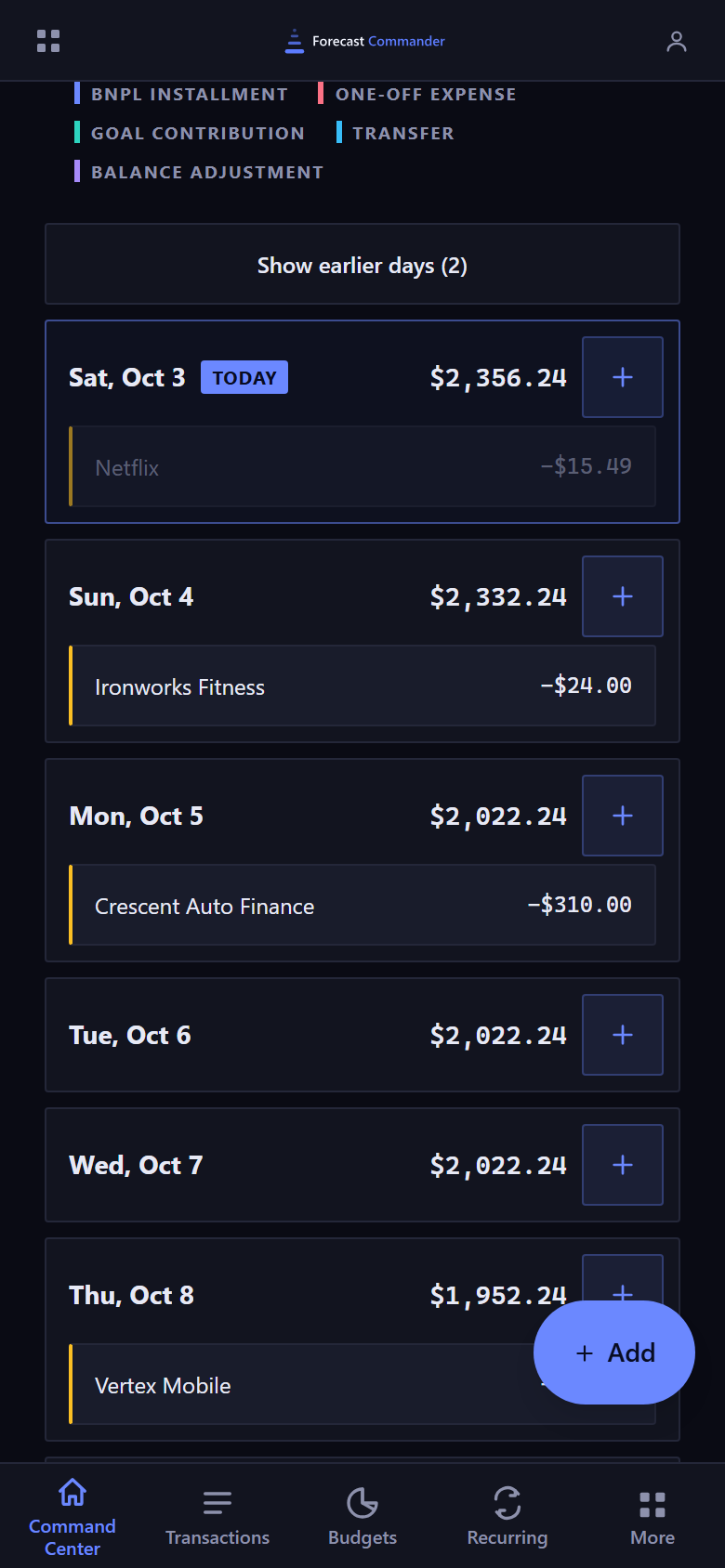
The Command Center calendar on a phone, as a list of days. At the top, the end of the legend naming the kinds by color: BNPL installment, one-off expense, goal contribution, transfer and balance adjustment. Then a Show earlier days button carrying its count, and one panel per day starting with today, marked TODAY, with its projected balance, 2,356 dollars 24, and a plus button to add a transaction on that day. Today holds one row, Netflix at minus 15 dollars 49, shown dimmed. The next days follow, each with its balance and its items: Ironworks Fitness at minus 24 dollars, Crescent Auto Finance at minus 310 dollars, then two days with nothing on them, then Vertex Mobile's day, partly behind the floating Add button. Each row has a colored left edge for its kind. Along the bottom, the tab bar with Command Center highlighted.The Command Center calendar on a phone, as a list of days. At the top, the end of the legend naming the kinds by color: BNPL installment, one-off expense, goal contribution, transfer and balance adjustment. Then a Show earlier days button carrying its count, and one panel per day starting with today, marked TODAY, with its projected balance, 2,356 dollars 24, and a plus button to add a transaction on that day. Today holds one row, Netflix at minus 15 dollars 49, shown dimmed. The next days follow, each with its balance and its items: Ironworks Fitness at minus 24 dollars, Crescent Auto Finance at minus 310 dollars, then two days with nothing on them, then Vertex Mobile's day, partly behind the floating Add button. Each row has a colored left edge for its kind. Along the bottom, the tab bar with Command Center highlighted.
The calendar at phone width as a list of days, starting at today.

New here? See what Forecast Commander does.