Scenarios
Try a decision before you make it. Add a change, read a plain-language verdict, and nothing touches your real forecast until you decide it should.
The screenshots are live captures of a demo account.
Last updated
What a scenario is#
A scenario answers "can I afford this?" by testing a change against your real forecast without touching it.
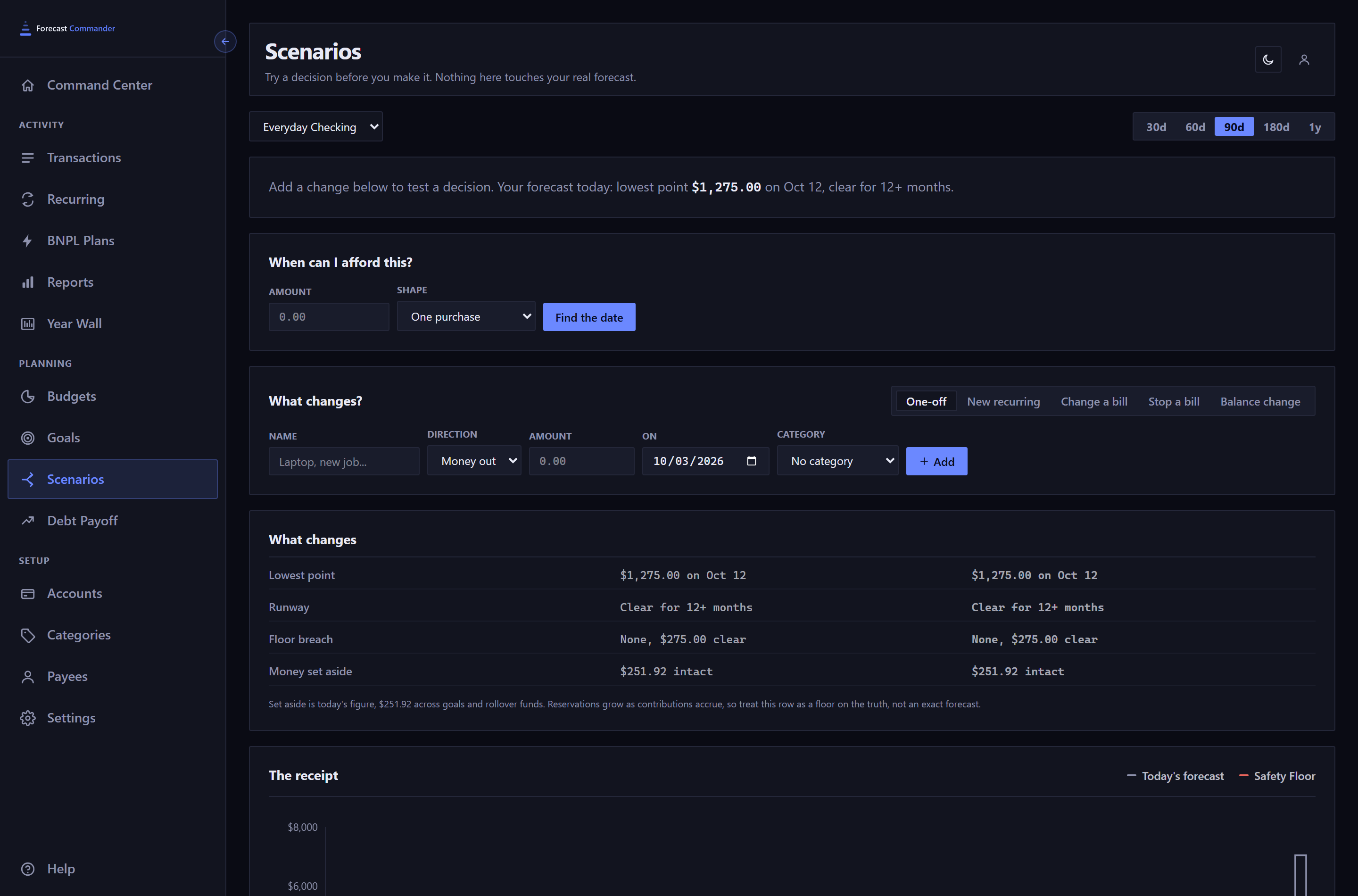
The page opens on your primary account, the same one the Command Center opens on, and the selector at the top switches to any other.
The five kinds of change#
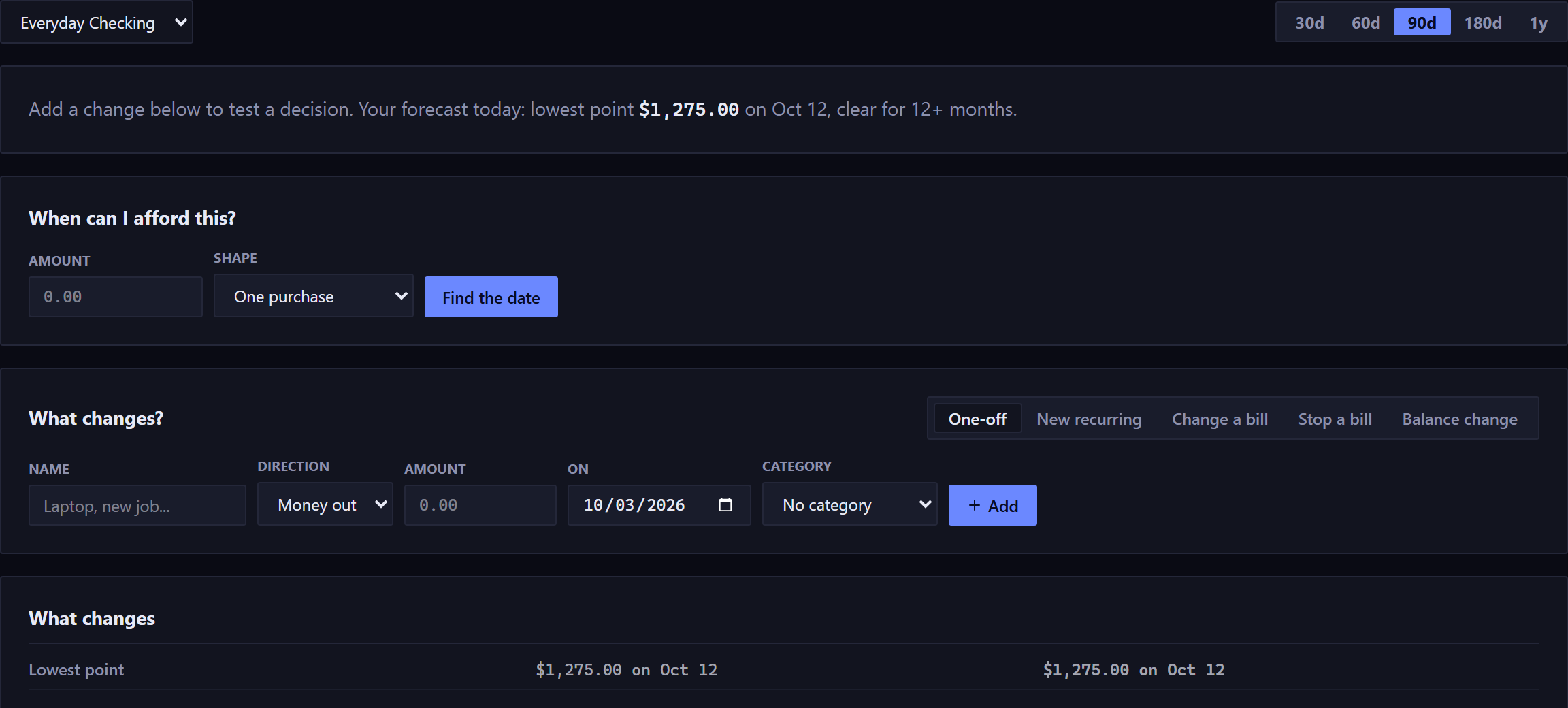
- One-off
- A single purchase or payment on a date, with a category if you want to see what it does to that budget. The laptop, the deposit, the repair.
- New recurring
- Something that starts repeating: a new subscription, a raise, a car payment.
- Change a bill
- An existing bill at a new amount, from its next date on or after today. One already due and not yet paid keeps its old amount. Rent going up.
- Stop a bill
- An existing bill ending from a date. Canceling something, or paying a loan off. Any date of it you edited on its own and haven't paid, from the stop on, is removed with it, and the confirmation lists each one before anything is written.
- Balance change
- A one-line adjustment to where you start from, for modeling. It's the only change that's never written into your real forecast, since it describes a starting point, not an event.
Added changes appear as chips you can remove. A chip whose date has passed is dimmed and marked, and left out of every number until you give it a new date. The app never moves it for you.
The verdict#
The answer is a sentence in one of five shapes:
- Yes, comfortably.
- It clears your safety floor with room, and doesn't touch money you set aside.
- Yes, and it is tight.
- It clears, but not by much, judged both against the size of your floor and against how much cushion you had to begin with.
- Yes, but it spends money you set aside.
- You stay above your floor only by eating into savings goals or carried budget funds, and it names how much.
- No, not as planned.
- The balance goes below your safety floor, and it says by how much and when.
- No floor to judge against.
- The account has no threshold, as with an amortizing loan, so there's no yes or no to give.
Underneath, a table shows the same measures before and after: the lowest point, the runway, whether the floor is breached, and how much set-aside money is touched. Only the cells that moved are highlighted.
When a scenario takes the balance below zero, a line at the top of the table names the stretch. Every row under it then describes a plan the account can't fund for those weeks.
Three more rows join when they have something to say: which goal pays and by how much time, how far the debt-free date moves, and what a purchase does to a budget.
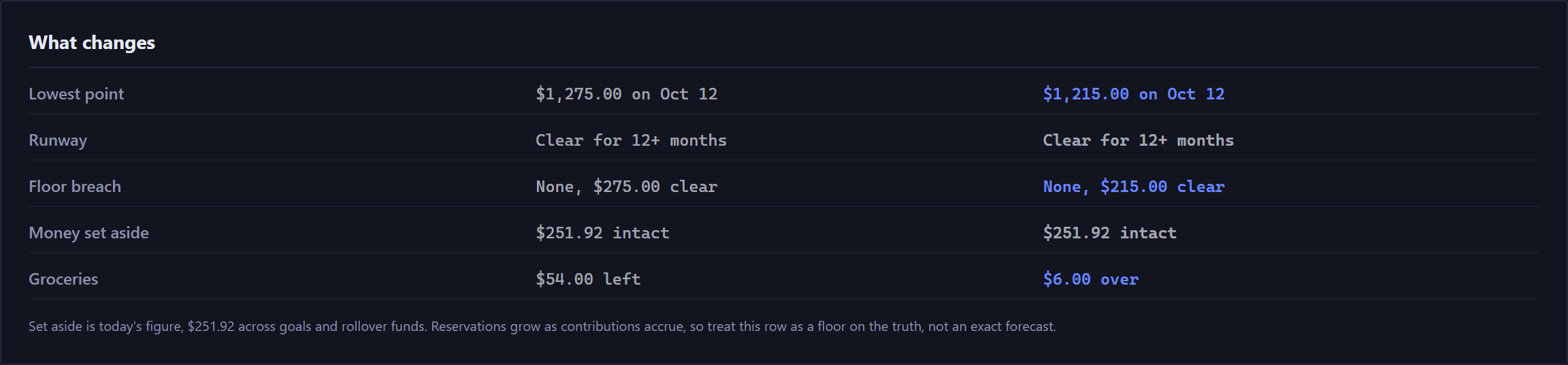
- Goals
- When the scenario spends money you've set aside, this row says which goal pays and by how much time. The money is counted in that goal's own contributions, and the new date is that many contributions past its target. Contributions the scenario can't make, because the balance is below your floor on their day, count as well.
- The money comes from carried budget funds first, then from the goal with the farthest target date. If you'd take it from somewhere else, the dates move with you.
- Debt-free
- On a card or loan with a rate and a payment, the payoff date before and after, the same arithmetic as the Debt Payoff page. A purchase is counted as if charged today. A scenario that adds a new recurring charge has no payoff date, since paying off assumes the charging has stopped.
- A budget
- A one-off purchase with a category shows what it does to that category this period: the card's Remaining before, and after. Purchases dated in a later period say so, since that period's budget doesn't exist yet.
When can I afford this?#
The inverse question: give it an amount, and it gives you a date.

It runs on top of whatever changes you already have in the sandbox, so the date it gives includes them.
Answers come in a few shapes: you can cover it today; you can from a given date; you can only by spending money you set aside, and here's how much; or not within the next 12 months.
If your forecast already dips below your floor on its own, it still answers, and says so beside the date. The date is then the first day this change adds no new dip, and the existing dip is yours to fix either way.
Saving and comparing#
A saved scenario stores only the changes, never the numbers. Each time you open it, everything is recomputed against your forecast as it stands then. Save it in March, open it in June, and it answers the June question.
Tick two or three in the saved list and Compare puts them side by side against a Doing nothing column. Each is measured on its own against the same starting point, and they're never merged into one.
A sentence above the table says what the comparison shows: that one option is stronger on every measure, or where the tradeoff is and what you get in return. When neither option clears your floor, it says so and doesn't rank them.
The comparison columns use neutral colors, never red and green. Compare works on one account at a time.
Making one real#
Make it real writes the scenario's changes into your actual forecast as real transactions and rules. Before it does, it shows exactly what will be written, grouped into Created, Changed and Skipped, with a reason for every skip. A one-off purchase with a category is written with it.
There's no undo, so read the preview. It's built from the same plan the write uses, so what it shows is what gets written.
Afterward the scenario becomes a permanent record of the decision. It can't be edited, loaded, compared or committed twice, and it's marked Committed in the list. To ask a new question from it, duplicate it.
A scenario has to be saved, with no unsaved edits, before it can be made real.
New here? See what Forecast Commander does.