The balance equation
Your bank shows one balance. Forecast Commander shows five, and the steps between them are the difference between what you have and what you can spend.
The screenshots are live captures of a demo account.
Last updated
Five balances#
Your bank's one number describes what has posted, not what's yours to spend.
The check you wrote last week hasn't cleared. The rent leaves on Friday. $600 is already promised to a savings goal. All of that is true at once, and one number can't say it.
So the app shows the whole chain, as one column you read from top to bottom. It opens from a panel that starts closed on its last four figures, and every deduction in it can be opened and checked.
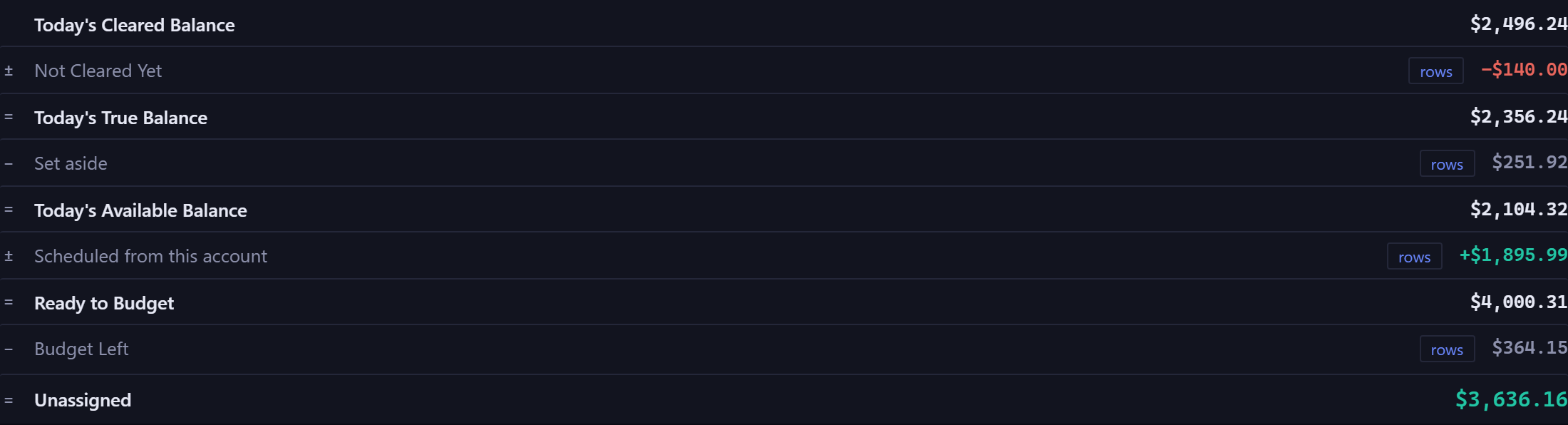
The chain, one step at a time#
- Today's Cleared Balance
- What has actually posted. It's the number your bank shows you, and the only one here that is.
- plus or minus Not Cleared Yet
- Everything dated today or earlier that hasn't posted, and it can go either way. A check from last week that nobody has cashed is in here too, so it's more than today's items.
- equals Today's True Balance
- What you really have, once the timing lag is taken out.
- minus Set aside
- Money already committed to a savings goal or carried forward by a budget category. It's still in the account, but it isn't yours to spend. More on money set aside.
- equals Today's Available Balance
- What you can spend right now. The forecast panel leads with True Balance and lists this one a step further along, so the two always agree.
On a checking or savings account the chain goes on. Scheduled from this account, plus or minus, is everything still to come on this account's calendar before the period ends, paychecks included, and it gives Uncommitted. If you budget, that figure is called Ready to Budget on your primary account, and minus Budget Left gives Unassigned.
A category that's over its budget counts as zero in Budget Left. Its overage is already spent or already on the calendar, so it's counted once, in the balance half. If Unassigned goes negative, your budgets have committed more than you have.
The chain above describes today. Browse the Command Center to another month and it frames that period. A future month starts from its Starting Balance, the balance at the end of the day before it begins, takes off what's set aside as of that day, adds the whole period's scheduled items, and ends in Uncommitted, so the figures build from one period to the next. A past month reads Starting Balance, plus or minus Posted This Period, equals Ending Balance, with no budgeting terms. A card ends in Ending Balance Owed whichever month you're looking at.
Every deduction opens#
Four of the terms are buttons. Click one and it lists exactly the items it's made of, so no figure in the breakdown has to be taken on trust.
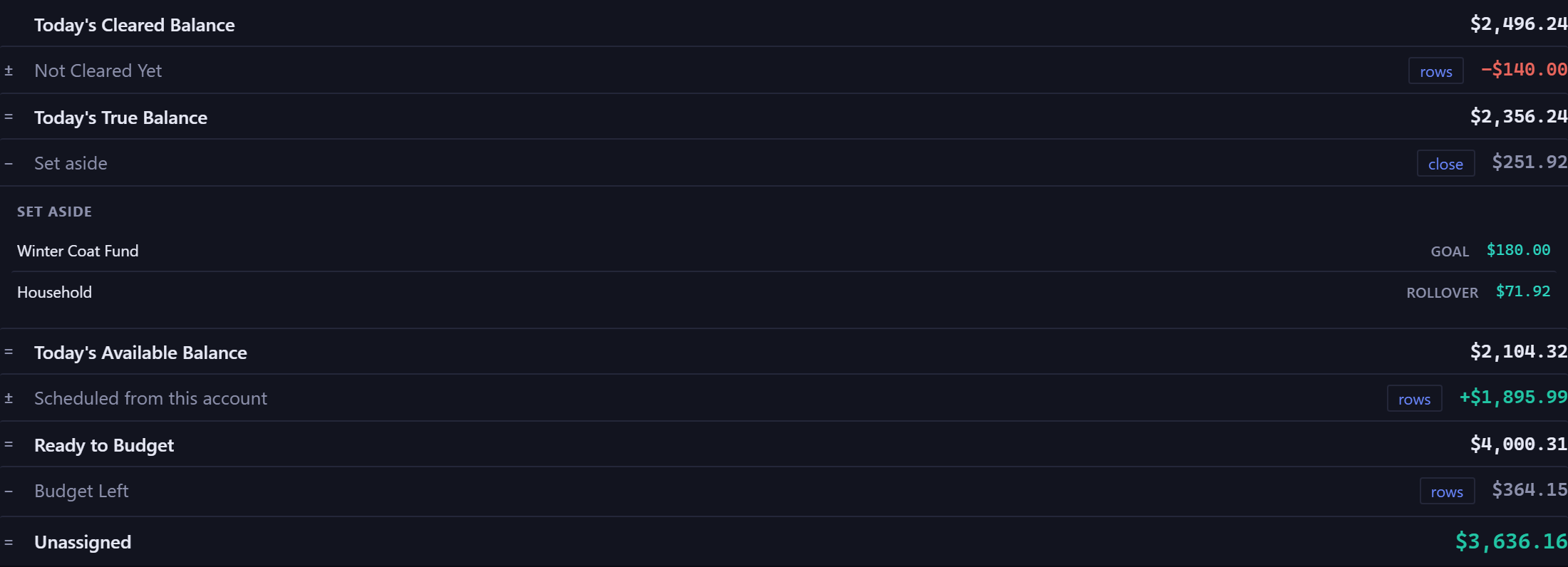
A term worth $0.00 has nothing to list and doesn't open. One opens at a time, and a long list shows its first few items with a link to the rest.
Why it differs from your banking app#
It should. Under Today's True Balance the forecast panel prints a small line that splits it in two: what has cleared, and what has not cleared yet, each with its own figure.
Your bank is showing the first figure, and the app shows what's left after the things you already know about. Neither is wrong, and the app shows you both.
Where you'll see it#
On the Command Center, describing today, for the account you're looking at. On the Budgets page, describing the end of the budget period.
Every checking and savings account's row runs through Scheduled from this account to Uncommitted: what's left once that account's scheduled items land, with reserved money taken out. Only the budgeting terms, Ready to Budget and Budget Left, belong to your primary account, since budgets aren't per account, and they join its row once you have a category budget or a watch. A card runs to Ending Balance Owed.
New here? See what Forecast Commander does.